
A patient app in Kotlin
The screens of a national health service's patient app, for Android phones and tablets, with Jetpack Compose and Lily.
What you'll build
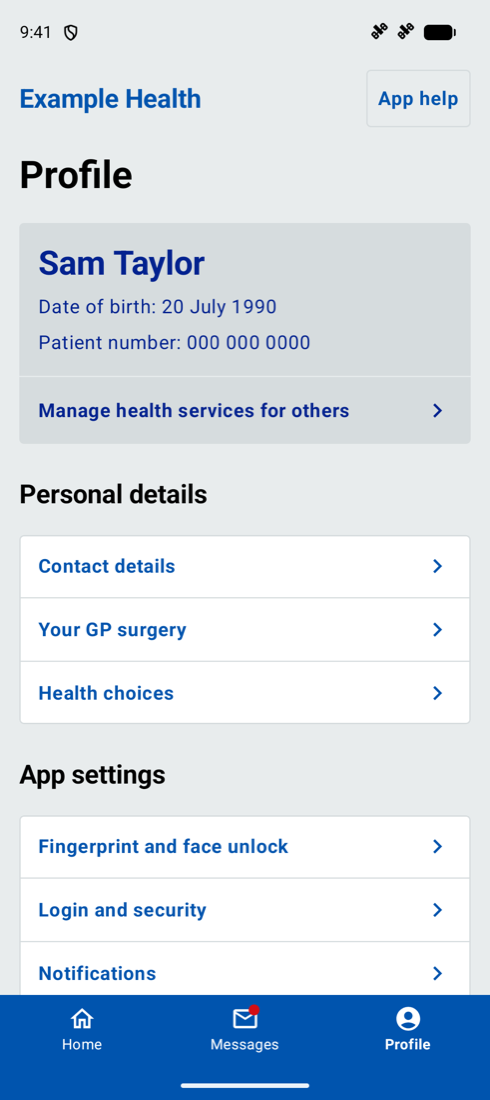
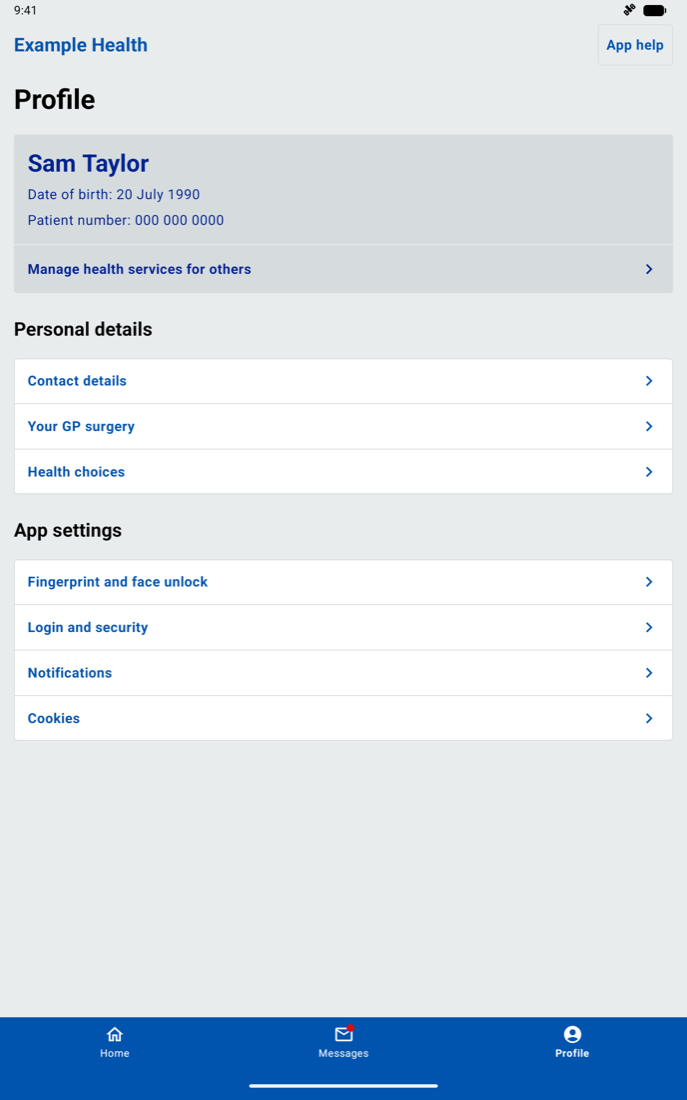
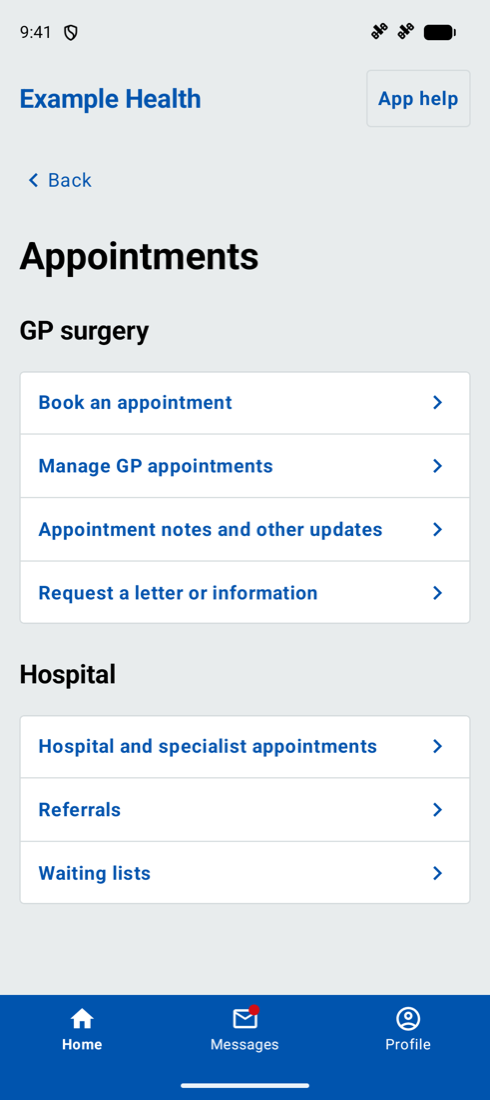
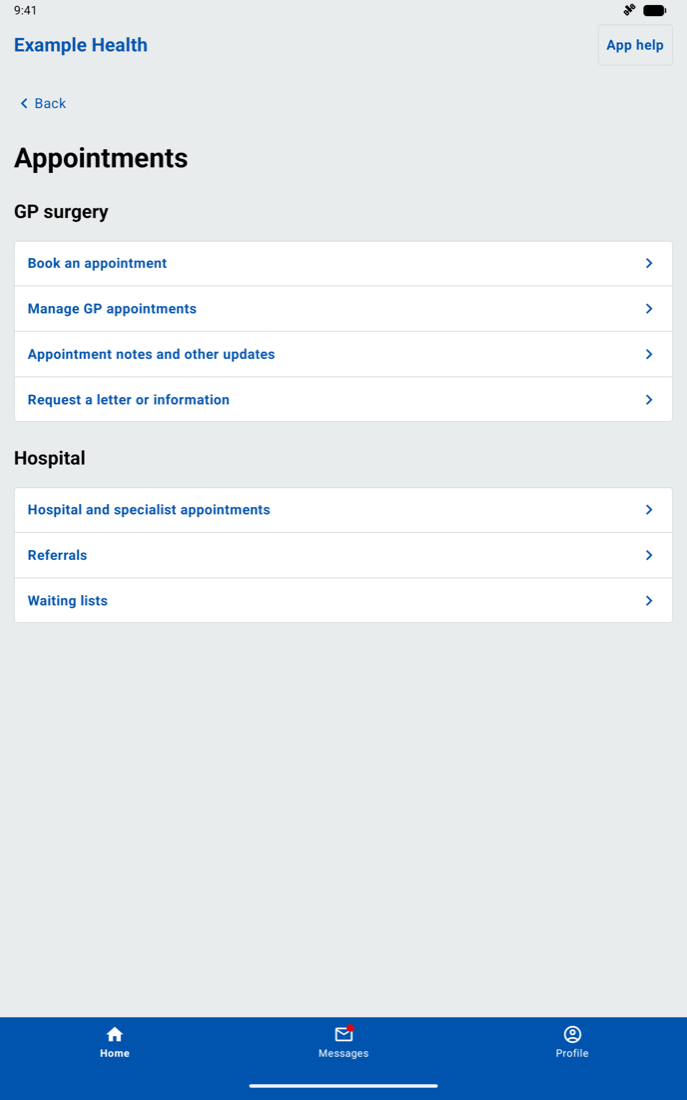
A patient app of the kind public health services publish: a start screen, then home, messages and profile in a tab bar, and from home the appointments, the medicines asked for and the test results. Seven screens, one app for phones and tablets in portrait, with example data for a person who does not exist. About an hour.
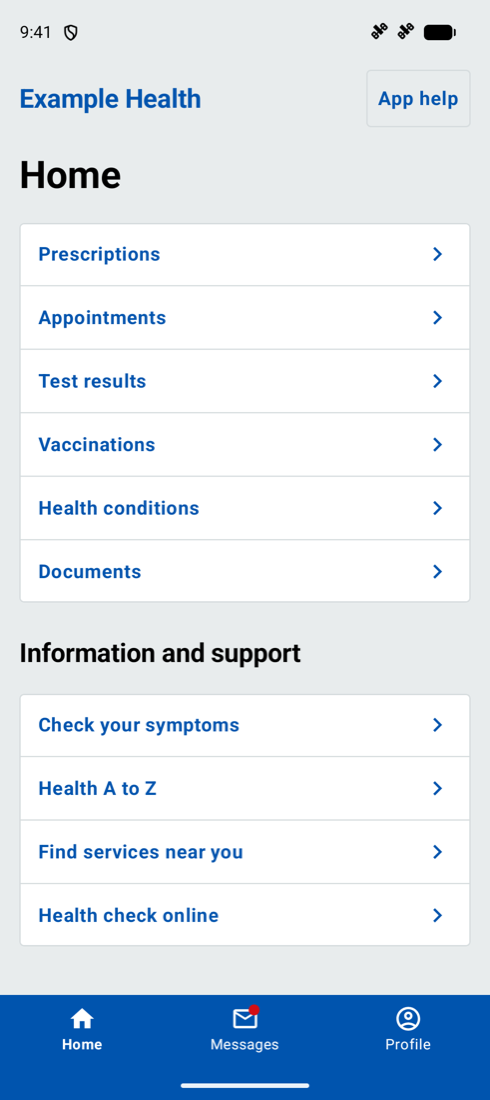
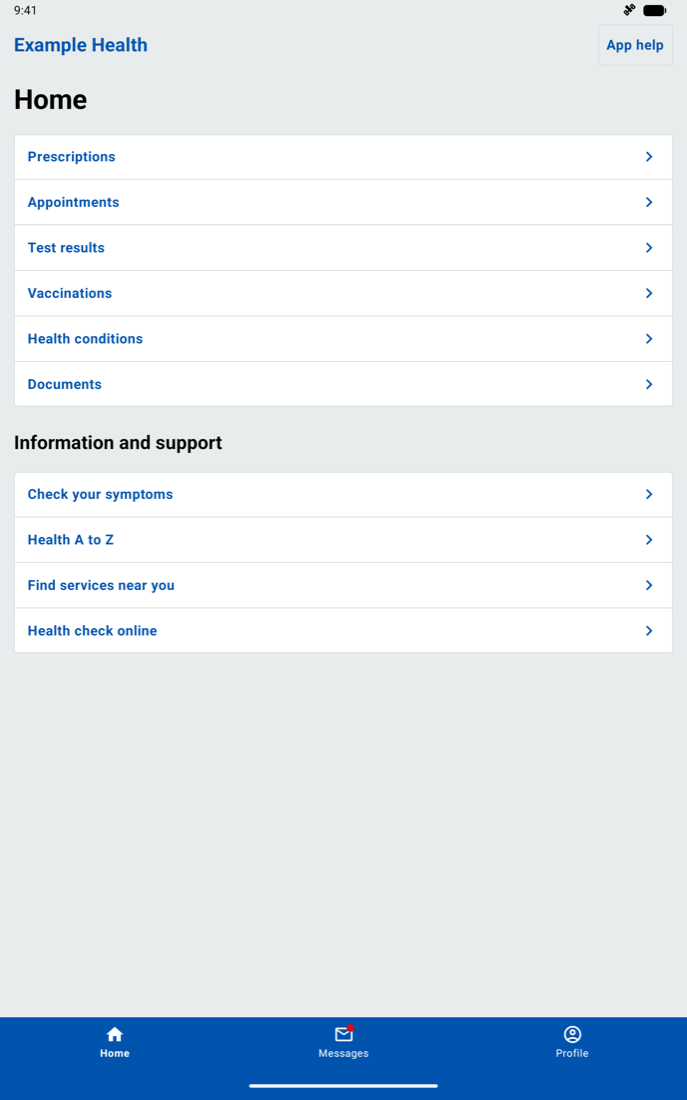
Whose look this is
The app wears Lily's NHS England patient theme: its colours, its type and its shapes. It is not the NHS App, and it does not say it is. It has its own name, Example Health, and no NHS name, logo or wordmark. A theme lends a service its look; it never lends it another body's identity, so your app supplies its own name and mark (visual identity). Swap the theme for another, and the same code is another country's app.
Before you start
You need Android Studio, JDK 17 or later, an emulator or device with Android 14 or later, and the Kotlin tutorial's first steps. Lily's Kotlin libraries are not on Maven Central yet, so the app is a module of the repository's own Gradle build:
git clone https://github.com/LilyDesignSystem/lily-design-system
cd lily-design-system/lily-design-system-kotlin
Add ":patient-app" to the include(…) line of settings.gradle.kts. Each code block below is one whole file, under the path
shown above it.
Step 1: Make the module
Lily's components are built on compose.foundation only. The app adds Material 3 for
its buttons and icons, the Android convention for both, and dresses them in the theme's colours.
patient-app/build.gradle.kts
// The patient app: seven screens, drawn with Lily's Compose components and Material 3's buttons and icons.
import org.jetbrains.kotlin.gradle.dsl.JvmTarget

plugins {
    alias(libs.plugins.android.application)
    alias(libs.plugins.kotlin.compose)
}

android {
    namespace = "com.example.patientapp"
    compileSdk { version = release(37) { minorApiLevel = 2 } }
    defaultConfig {
        applicationId = "com.example.patientapp"
        minSdk = 26
        targetSdk = 37
        versionCode = 1
        versionName = "1.0"
        testInstrumentationRunner = "androidx.test.runner.AndroidJUnitRunner"
    }
    compileOptions {
        sourceCompatibility = JavaVersion.VERSION_17
        targetCompatibility = JavaVersion.VERSION_17
    }
}

kotlin { compilerOptions { jvmTarget.set(JvmTarget.JVM_17) } }

dependencies {
    implementation(project(":lily-compose"))
    implementation(project(":lily-compose-themes"))
    implementation(platform(libs.compose.bom))
    implementation(libs.compose.foundation)
    implementation("androidx.compose.material3:material3")
    implementation("androidx.compose.material:material-icons-extended")
    implementation(libs.activity.compose)
    androidTestImplementation(platform(libs.compose.bom))
    androidTestImplementation(libs.compose.ui.test.junit4)
    androidTestImplementation(libs.compose.ui.test.junit4.accessibility)
    androidTestImplementation(libs.androidx.test.runner)
    androidTestImplementation(libs.androidx.test.ext.junit)
    debugImplementation(platform(libs.compose.bom))
    debugImplementation(libs.compose.ui.test.manifest)
}
patient-app/src/main/AndroidManifest.xml
<?xml version="1.0" encoding="utf-8"?>
<manifest xmlns:android="http://schemas.android.com/apk/res/android">
    <application
        android:label="@string/app_name"
        android:supportsRtl="true"
        android:allowBackup="false"
        android:theme="@android:style/Theme.Material.Light.NoActionBar">
        <activity
            android:name=".MainActivity"
            android:exported="true">
            <intent-filter>
                <action android:name="android.intent.action.MAIN" />
                <category android:name="android.intent.category.LAUNCHER" />
            </intent-filter>
        </activity>
    </application>
</manifest>
Step 2: Write the words
Every word the app shows is a string resource, so a translation is another values- folder. A count that changes its words, such as "1 unread message", is a plural resource: Lily
never builds a sentence.
patient-app/src/main/res/values/strings.xml
<?xml version="1.0" encoding="utf-8"?>
<!-- Every word the app shows. Lily's components have none of their own. -->
<resources>
    <string name="app_name">Example Health</string>
    <!-- The language the app writes dates in. -->
    <string name="locale" translatable="false">en-GB</string>
    <string name="help">Help</string>
    <string name="app_help">App help</string>
    <string name="start_heading">Access your health services</string>
    <string name="continue_label">Continue</string>
    <string name="version">Version 1.0</string>
    <string name="back">Back</string>
    <string name="tabs">Main sections</string>
    <string name="home">Home</string>
    <string name="messages">Messages</string>
    <string name="profile">Profile</string>
    <plurals name="unread">
        <item quantity="one">%d unread message</item>
        <item quantity="other">%d unread messages</item>
    </plurals>
    <string name="prescriptions">Prescriptions</string>
    <string name="appointments">Appointments</string>
    <string name="test_results">Test results</string>
    <string name="vaccinations">Vaccinations</string>
    <string name="health_conditions">Health conditions</string>
    <string name="documents">Documents</string>
    <string name="support">Information and support</string>
    <string name="symptoms">Check your symptoms</string>
    <string name="health_a_to_z">Health A to Z</string>
    <string name="services_near_you">Find services near you</string>
    <string name="health_check">Health check online</string>
    <plurals name="inbox_count">
        <item quantity="one">You have %d inbox</item>
        <item quantity="other">You have %d inboxes</item>
    </plurals>
    <string name="date_of_birth">Date of birth: %s</string>
    <string name="patient_number">Patient number: %s</string>
    <string name="others_services">Manage health services for others</string>
    <string name="personal_details">Personal details</string>
    <string name="contact_details">Contact details</string>
    <string name="your_surgery">Your GP surgery</string>
    <string name="health_choices">Health choices</string>
    <string name="app_settings">App settings</string>
    <string name="biometrics">Fingerprint and face unlock</string>
    <string name="login_security">Login and security</string>
    <string name="notifications">Notifications</string>
    <string name="cookies">Cookies</string>
    <string name="gp_surgery">GP surgery</string>
    <string name="book_appointment">Book an appointment</string>
    <string name="manage_appointments">Manage GP appointments</string>
    <string name="appointment_notes">Appointment notes and other updates</string>
    <string name="request_letter">Request a letter or information</string>
    <string name="hospital">Hospital</string>
    <string name="hospital_appointments">Hospital and specialist appointments</string>
    <string name="referrals">Referrals</string>
    <string name="waiting_lists">Waiting lists</string>
    <string name="requested_medicines">Requested medicines</string>
    <string name="requested_intro">Your GP needs to approve the medicines you requested in the app. If your request is rejected, contact your GP surgery.</string>
    <string name="check_pharmacy">Check prescriptions with the pharmacy</string>
    <string name="status">Status: %s</string>
    <string name="requested">Requested: %s</string>
    <string name="status_waiting">Waiting GP approval</string>
    <string name="status_approved">Approved by GP</string>
    <string name="status_rejected">Rejected by GP</string>
    <string name="results_heading">GP-ordered test results</string>
    <string name="showing_from">Showing results from %s</string>
    <string name="not_built">This screen is not part of the tutorial. Its link shows where it would go.</string>
</resources>
Step 3: The records
A real app asks its service for these after the person signs in. A date in a record is a
calendar date, not a moment, so it is a LocalDate, which has no time zone to
move it a day.
patient-app/src/main/kotlin/com/example/patientapp/Records.kt
// The patient's records: example data for a person who does not exist. A real app asks its service for them, after sign-in.
package com.example.patientapp

import java.time.LocalDate
import java.time.format.DateTimeFormatter
import java.time.format.FormatStyle
import java.util.Locale

enum class RequestStatus { Waiting, Approved, Rejected }

data class Inbox(val title: String, val intro: String, val topics: List<String>, val unread: Int)

/** [requested] is YYYY-MM-DD: a calendar date, not a moment. */
data class MedicineRequest(val name: String, val directions: String, val requested: String, val status: RequestStatus)

/** [date] is YYYY-MM-DD; [comment] is the clinician's, when there is one. */
data class TestResult(val name: String, val date: String, val comment: String?)

object Records {
    const val NAME = "Sam Taylor"
    const val BIRTH_DATE = "1990-07-20"
    const val PATIENT_NUMBER = "000 000 0000"

    val inboxes = listOf(
        Inbox(
            "Your healthcare services", "You may receive messages:",
            listOf("from your GP surgery", "about hospital and specialist appointments", "about invitations and reminders"), 1,
        ),
        Inbox(
            "Your hospital and specialist doctors", "You may send or receive messages about:",
            listOf("your health record", "documents and letters", "questionnaires before an appointment"), 0,
        ),
        Inbox(
            "Replies to your GP requests", "You may receive replies to questions you sent about:",
            listOf("your health", "admin, such as a fit note"), 0,
        ),
        Inbox("Practice messaging", "Send and view messages from staff at your GP surgery", emptyList(), 0),
    )

    val requests = listOf(
        MedicineRequest("Beclometasone 100 micrograms inhaler", "2 puffs twice a day, 25 days", "2026-11-20", RequestStatus.Waiting),
        MedicineRequest("Metformin 500 mg tablets", "Take two twice a day, 112 tablets", "2026-09-12", RequestStatus.Approved),
        MedicineRequest("Ramipril 2.5 mg capsules", "Take one capsule a day, 28 capsules", "2026-06-15", RequestStatus.Approved),
        MedicineRequest("Amlodipine 5 mg tablets", "Take one a day, 28 tablets", "2026-05-31", RequestStatus.Rejected),
    )

    val results = listOf(
        TestResult("Haemoglobin A1c level", "2026-11-24", "Normal, no action needed"),
        TestResult("Blood pressure reading", "2026-11-11", null),
        TestResult("Full blood count", "2026-09-04", "Normal, no action needed"),
    )
}

/** Dates as the app's readers write them. LocalDate has no time zone to move a record's date a day. */
object Dates {
    fun long(iso: String, locale: Locale): String =
        LocalDate.parse(iso).format(DateTimeFormatter.ofLocalizedDate(FormatStyle.LONG).withLocale(locale))

    fun month(iso: String, locale: Locale): String = LocalDate.parse(iso).format(DateTimeFormatter.ofPattern("MMMM yyyy", locale))
}
Step 4: The parts every screen shares
A screen with its heading and, when it was opened from another, a Back button; a section heading; and the link list that is the app's way into every service. Each row is a button that says its words; the chevron has no description, so TalkBack does not read it.
patient-app/src/main/kotlin/com/example/patientapp/Parts.kt
// The parts every screen shares: the screen with its Back button and heading, a section heading, and the link list.
package com.example.patientapp

import androidx.compose.foundation.background
import androidx.compose.foundation.border
import androidx.compose.foundation.clickable
import androidx.compose.foundation.layout.Arrangement
import androidx.compose.foundation.layout.Column
import androidx.compose.foundation.layout.ColumnScope
import androidx.compose.foundation.layout.Row
import androidx.compose.foundation.layout.fillMaxSize
import androidx.compose.foundation.layout.fillMaxWidth
import androidx.compose.foundation.layout.heightIn
import androidx.compose.foundation.layout.padding
import androidx.compose.foundation.rememberScrollState
import androidx.compose.foundation.shape.RoundedCornerShape
import androidx.compose.foundation.verticalScroll
import androidx.compose.material.icons.Icons
import androidx.compose.material.icons.automirrored.filled.KeyboardArrowLeft
import androidx.compose.material.icons.automirrored.filled.KeyboardArrowRight
import androidx.compose.material3.HorizontalDivider
import androidx.compose.material3.Icon
import androidx.compose.material3.MaterialTheme
import androidx.compose.material3.Text
import androidx.compose.runtime.Composable
import androidx.compose.ui.Alignment
import androidx.compose.ui.Modifier
import androidx.compose.ui.res.stringResource
import androidx.compose.ui.semantics.Role
import androidx.compose.ui.semantics.heading
import androidx.compose.ui.semantics.semantics
import androidx.compose.ui.text.font.FontWeight
import androidx.compose.ui.unit.dp
import io.github.lilydesignsystem.compose.themes.LocalLilyTokens

/** One screen: a Back button when it was opened from another, its heading, and its content, scrolling on the page colour. */
@Composable
fun Screen(title: String, onBack: (() -> Unit)? = null, content: @Composable ColumnScope.() -> Unit) {
    Column(
        modifier = Modifier
            .fillMaxSize()
            .background(LocalLilyTokens.current.base200)
            .verticalScroll(rememberScrollState())
            .padding(16.dp),
        verticalArrangement = Arrangement.spacedBy(20.dp),
    ) {
        if (onBack != null) {
            Row(
                verticalAlignment = Alignment.CenterVertically,
                modifier = Modifier.heightIn(min = 48.dp).clickable(role = Role.Button, onClick = onBack),
            ) {
                Icon(Icons.AutoMirrored.Filled.KeyboardArrowLeft, contentDescription = null, tint = MaterialTheme.colorScheme.primary)
                Text(stringResource(R.string.back), color = MaterialTheme.colorScheme.primary)
            }
        }
        Text(title, style = MaterialTheme.typography.headlineLarge, fontWeight = FontWeight.Bold, modifier = Modifier.semantics { heading() })
        content()
    }
}

/** A section's heading inside a screen. */
@Composable
fun SectionHeading(text: String) {
    Text(
        text,
        style = MaterialTheme.typography.titleLarge,
        fontWeight = FontWeight.Bold,
        modifier = Modifier.padding(top = 8.dp).semantics { heading() },
    )
}

/** One row of a link list: its words, and what choosing it does. */
data class LinkRow(val title: String, val onClick: () -> Unit)

/**
 * Links in a white box, one a row, each with a chevron: the app's way into each service. Each row is a button that says its
 * words; the chevron is decoration, with no description.
 */
@Composable
fun LinkList(rows: List<LinkRow>) {
    val tokens = LocalLilyTokens.current
    val shape = RoundedCornerShape(4.dp)
    Column(Modifier.fillMaxWidth().background(tokens.base100, shape).border(1.dp, tokens.base300, shape)) {
        rows.forEachIndexed { index, row ->
            if (index > 0) HorizontalDivider(color = tokens.base300)
            Row(
                verticalAlignment = Alignment.CenterVertically,
                modifier = Modifier
                    .fillMaxWidth()
                    .heightIn(min = 52.dp)
                    .clickable(role = Role.Button, onClick = row.onClick)
                    .padding(horizontal = 16.dp, vertical = 12.dp),
            ) {
                Text(row.title, fontWeight = FontWeight.Bold, color = tokens.primary, modifier = Modifier.weight(1f))
                Icon(Icons.AutoMirrored.Filled.KeyboardArrowRight, contentDescription = null, tint = tokens.primary)
            }
        }
    }
}

/** The screen behind a link this tutorial does not build. */
@Composable
fun NotBuilt(title: String, onBack: () -> Unit) {
    Screen(title, onBack) { Text(stringResource(R.string.not_built)) }
}
Step 5: The screens
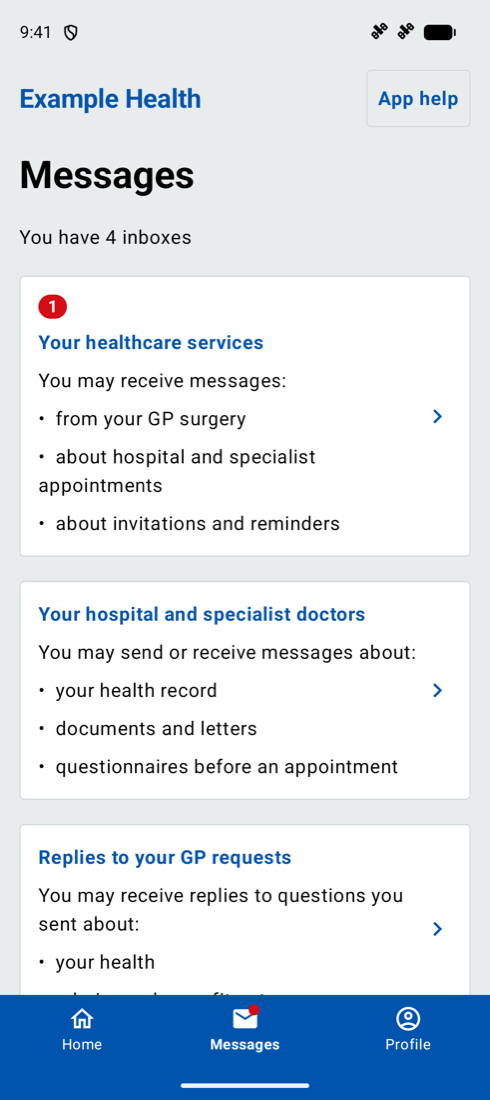
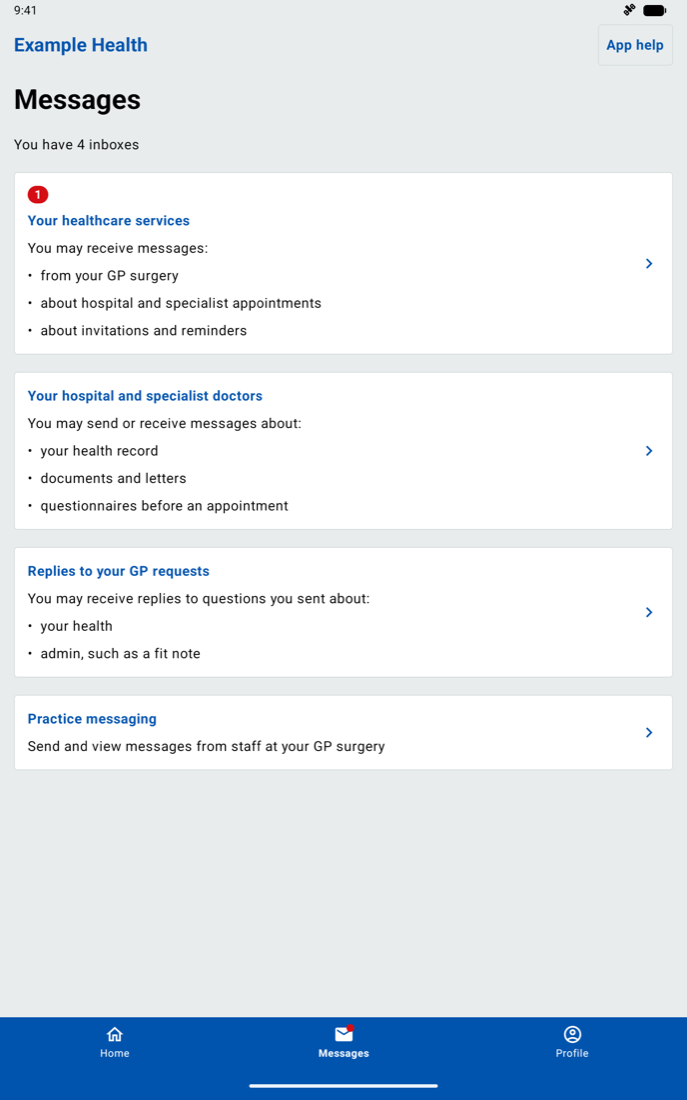
Each screen gets open, to go to another screen in its tab, and back when it was opened from one. Messages uses a Lily LilyCard for each inbox and a LilyBadge for the unread count, which TalkBack reads as "1 unread message".
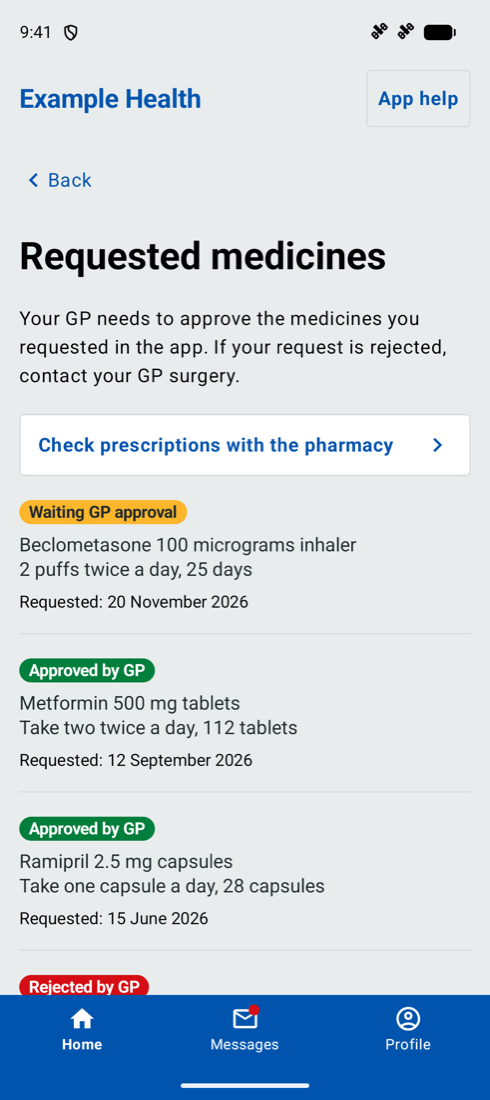
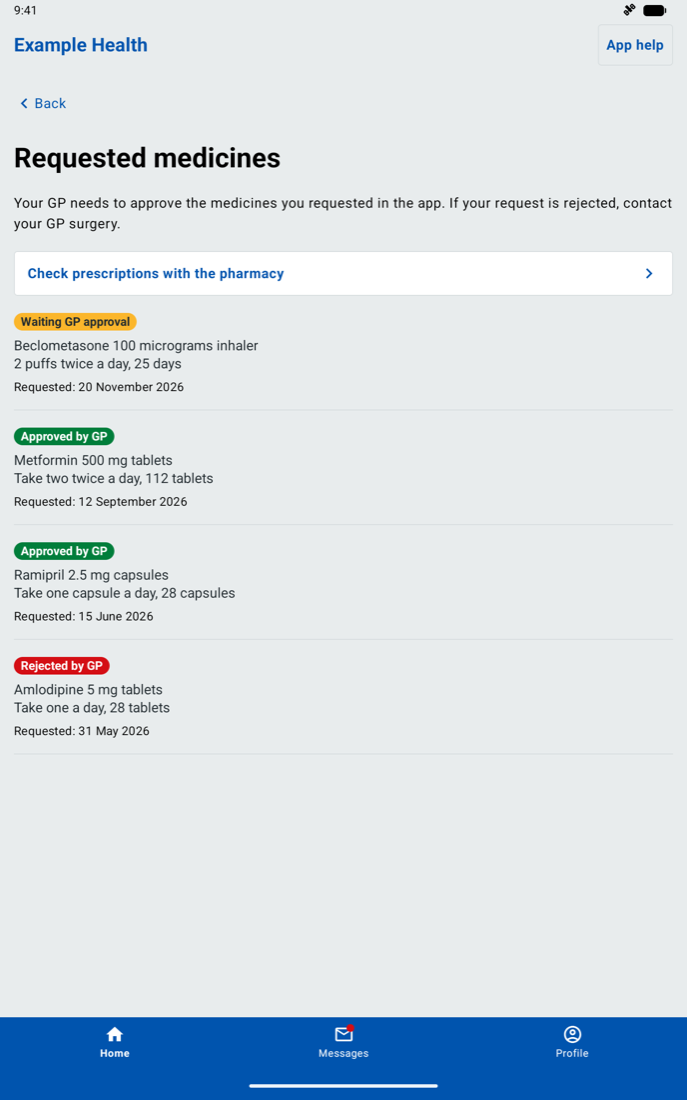
Requested medicines gives each request's status as a badge in words, coloured by its kind
but never by colour alone, and each medicine as a Lily MedicationView.
patient-app/src/main/kotlin/com/example/patientapp/Screens.kt
// The seven screens. Each gets `open`, to go to another screen in its tab, and `back` when it was opened from one.
package com.example.patientapp

import androidx.compose.foundation.background
import androidx.compose.foundation.clickable
import androidx.compose.foundation.layout.Arrangement
import androidx.compose.foundation.layout.Column
import androidx.compose.foundation.layout.Row
import androidx.compose.foundation.layout.Spacer
import androidx.compose.foundation.layout.fillMaxWidth
import androidx.compose.foundation.layout.heightIn
import androidx.compose.foundation.layout.padding
import androidx.compose.foundation.shape.RoundedCornerShape
import androidx.compose.material.icons.Icons
import androidx.compose.material.icons.automirrored.filled.KeyboardArrowRight
import androidx.compose.material3.HorizontalDivider
import androidx.compose.material3.Icon
import androidx.compose.material3.MaterialTheme
import androidx.compose.material3.Text
import androidx.compose.runtime.Composable
import androidx.compose.ui.Alignment
import androidx.compose.ui.Modifier
import androidx.compose.ui.res.pluralStringResource
import androidx.compose.ui.res.stringResource
import androidx.compose.ui.semantics.Role
import androidx.compose.ui.semantics.heading
import androidx.compose.ui.semantics.semantics
import androidx.compose.ui.text.font.FontWeight
import androidx.compose.ui.unit.dp
import io.github.lilydesignsystem.compose.BadgeKind
import io.github.lilydesignsystem.compose.LilyBadge
import io.github.lilydesignsystem.compose.LilyCard
import io.github.lilydesignsystem.compose.MedicationView
import io.github.lilydesignsystem.compose.themes.LocalLilyTokens
import java.util.Locale

/** Where a link goes inside a tab. */
sealed interface Route {
    data object Appointments : Route
    data object Prescriptions : Route
    data object TestResults : Route
    data class NotBuilt(val title: String) : Route
}

@Composable
private fun later(open: (Route) -> Unit, title: String) = LinkRow(title) { open(Route.NotBuilt(title)) }

@Composable
fun HomeScreen(open: (Route) -> Unit) {
    Screen(stringResource(R.string.home)) {
        LinkList(
            listOf(
                LinkRow(stringResource(R.string.prescriptions)) { open(Route.Prescriptions) },
                LinkRow(stringResource(R.string.appointments)) { open(Route.Appointments) },
                LinkRow(stringResource(R.string.test_results)) { open(Route.TestResults) },
                later(open, stringResource(R.string.vaccinations)),
                later(open, stringResource(R.string.health_conditions)),
                later(open, stringResource(R.string.documents)),
            ),
        )
        SectionHeading(stringResource(R.string.support))
        LinkList(
            listOf(
                later(open, stringResource(R.string.symptoms)),
                later(open, stringResource(R.string.health_a_to_z)),
                later(open, stringResource(R.string.services_near_you)),
                later(open, stringResource(R.string.health_check)),
            ),
        )
    }
}

/** A card that opens something, with a chevron at its end. */
@Composable
private fun CardLink(onClick: () -> Unit, content: @Composable () -> Unit) {
    LilyCard(Modifier.fillMaxWidth().clickable(role = Role.Button, onClick = onClick)) {
        Row(verticalAlignment = Alignment.CenterVertically) {
            Column(Modifier.weight(1f), verticalArrangement = Arrangement.spacedBy(8.dp)) { content() }
            Icon(Icons.AutoMirrored.Filled.KeyboardArrowRight, contentDescription = null, tint = LocalLilyTokens.current.primary)
        }
    }
}

/** The inboxes, each a card that opens it. An unread count is a Lily badge, which TalkBack reads in words. */
@Composable
fun MessagesScreen(open: (Route) -> Unit) {
    val primary = LocalLilyTokens.current.primary
    Screen(stringResource(R.string.messages)) {
        Text(pluralStringResource(R.plurals.inbox_count, Records.inboxes.size, Records.inboxes.size))
        Records.inboxes.forEach { inbox ->
            CardLink({ open(Route.NotBuilt(inbox.title)) }) {
                if (inbox.unread > 0) {
                    LilyBadge(
                        inbox.unread.toString(),
                        kind = BadgeKind.Error,
                        label = pluralStringResource(R.plurals.unread, inbox.unread, inbox.unread),
                    )
                }
                Text(inbox.title, fontWeight = FontWeight.Bold, color = primary)
                Text(inbox.intro)
                inbox.topics.forEach { Text("•  $it") }
            }
        }
    }
}

@Composable
fun ProfileScreen(open: (Route) -> Unit) {
    val tokens = LocalLilyTokens.current
    val locale = Locale.forLanguageTag(stringResource(R.string.locale))
    val others = stringResource(R.string.others_services)
    Screen(stringResource(R.string.profile)) {
        // The person the app is about: their name, date of birth and number.
        Column(Modifier.fillMaxWidth().background(tokens.base300, RoundedCornerShape(4.dp))) {
            Column(Modifier.padding(16.dp), verticalArrangement = Arrangement.spacedBy(6.dp)) {
                Text(
                    Records.NAME,
                    style = MaterialTheme.typography.headlineMedium,
                    fontWeight = FontWeight.Bold,
                    color = tokens.secondary,
                    modifier = Modifier.semantics { heading() },
                )
                Text(stringResource(R.string.date_of_birth, Dates.long(Records.BIRTH_DATE, locale)), color = tokens.secondary)
                Text(stringResource(R.string.patient_number, Records.PATIENT_NUMBER), color = tokens.secondary)
            }
            HorizontalDivider(color = tokens.base200)
            Row(
                verticalAlignment = Alignment.CenterVertically,
                modifier = Modifier
                    .fillMaxWidth()
                    .heightIn(min = 52.dp)
                    .clickable(role = Role.Button) { open(Route.NotBuilt(others)) }
                    .padding(16.dp),
            ) {
                Text(others, fontWeight = FontWeight.Bold, color = tokens.secondary, modifier = Modifier.weight(1f))
                Icon(Icons.AutoMirrored.Filled.KeyboardArrowRight, contentDescription = null, tint = tokens.secondary)
            }
        }
        SectionHeading(stringResource(R.string.personal_details))
        LinkList(
            listOf(
                later(open, stringResource(R.string.contact_details)),
                later(open, stringResource(R.string.your_surgery)),
                later(open, stringResource(R.string.health_choices)),
            ),
        )
        SectionHeading(stringResource(R.string.app_settings))
        LinkList(
            listOf(
                later(open, stringResource(R.string.biometrics)),
                later(open, stringResource(R.string.login_security)),
                later(open, stringResource(R.string.notifications)),
                later(open, stringResource(R.string.cookies)),
            ),
        )
    }
}

@Composable
fun AppointmentsScreen(open: (Route) -> Unit, back: () -> Unit) {
    Screen(stringResource(R.string.appointments), back) {
        SectionHeading(stringResource(R.string.gp_surgery))
        LinkList(
            listOf(
                later(open, stringResource(R.string.book_appointment)),
                later(open, stringResource(R.string.manage_appointments)),
                later(open, stringResource(R.string.appointment_notes)),
                later(open, stringResource(R.string.request_letter)),
            ),
        )
        SectionHeading(stringResource(R.string.hospital))
        LinkList(
            listOf(
                later(open, stringResource(R.string.hospital_appointments)),
                later(open, stringResource(R.string.referrals)),
                later(open, stringResource(R.string.waiting_lists)),
            ),
        )
    }
}

/** The medicines asked for, newest first, each with its status in words: a Lily badge, whose colour is never the only cue. */
@Composable
fun PrescriptionsScreen(open: (Route) -> Unit, back: () -> Unit) {
    val locale = Locale.forLanguageTag(stringResource(R.string.locale))
    Screen(stringResource(R.string.requested_medicines), back) {
        Text(stringResource(R.string.requested_intro))
        LinkList(listOf(later(open, stringResource(R.string.check_pharmacy))))
        Records.requests.forEach { request ->
            val (words, kind) = when (request.status) {
                RequestStatus.Waiting -> stringResource(R.string.status_waiting) to BadgeKind.Warning
                RequestStatus.Approved -> stringResource(R.string.status_approved) to BadgeKind.Success
                RequestStatus.Rejected -> stringResource(R.string.status_rejected) to BadgeKind.Error
            }
            Column(verticalArrangement = Arrangement.spacedBy(8.dp)) {
                LilyBadge(words, kind = kind, label = stringResource(R.string.status, words))
                MedicationView(name = request.name, dosageText = request.directions)
                Text(stringResource(R.string.requested, Dates.long(request.requested, locale)), style = MaterialTheme.typography.bodyMedium)
                HorizontalDivider(Modifier.padding(top = 8.dp), color = LocalLilyTokens.current.base300)
            }
        }
    }
}

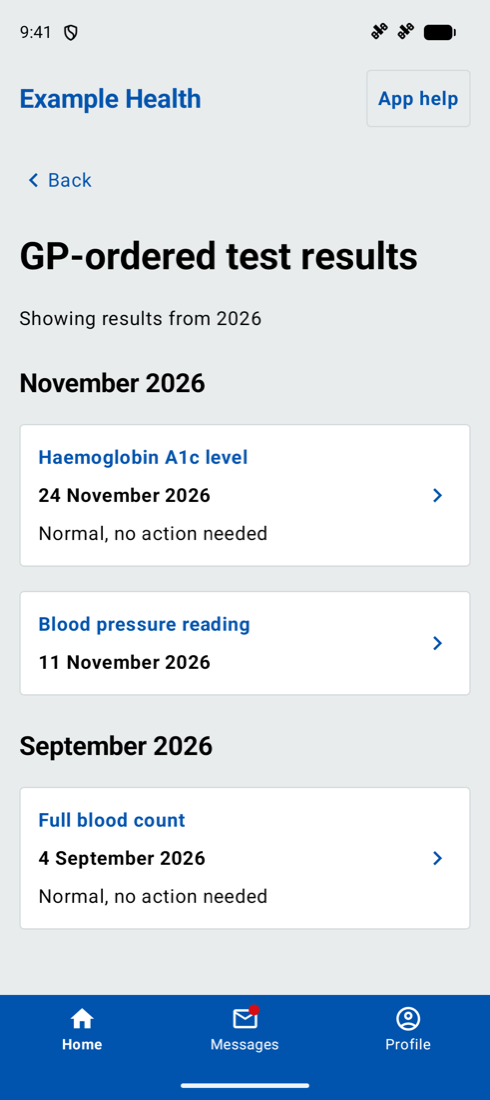
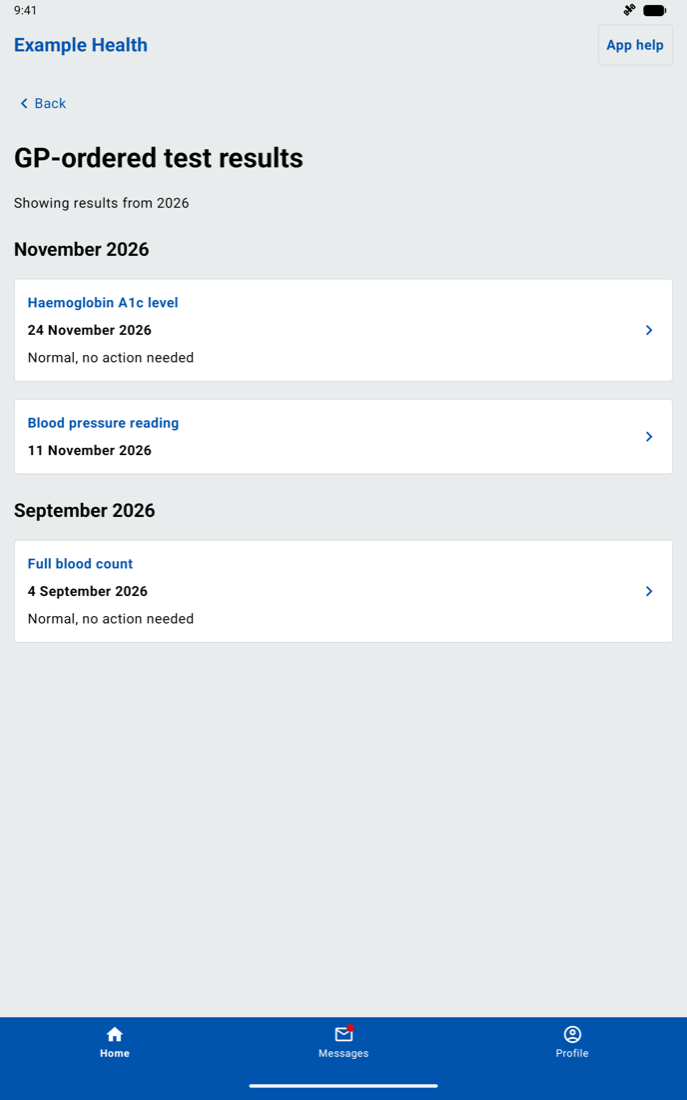
/** Results grouped by the month they were taken, newest first; each card opens the result. */
@Composable
fun TestResultsScreen(open: (Route) -> Unit, back: () -> Unit) {
    val locale = Locale.forLanguageTag(stringResource(R.string.locale))
    val primary = LocalLilyTokens.current.primary
    Screen(stringResource(R.string.results_heading), back) {
        Text(stringResource(R.string.showing_from, Records.results.first().date.take(4)))
        Records.results.groupBy { Dates.month(it.date, locale) }.forEach { (month, results) ->
            SectionHeading(month)
            results.forEach { result ->
                CardLink({ open(Route.NotBuilt(result.name)) }) {
                    Text(result.name, fontWeight = FontWeight.Bold, color = primary)
                    Text(Dates.long(result.date, locale), fontWeight = FontWeight.Bold)
                    result.comment?.let { Text(it) }
                }
            }
        }
        Spacer(Modifier.heightIn(min = 8.dp))
    }
}
Step 6: The frame
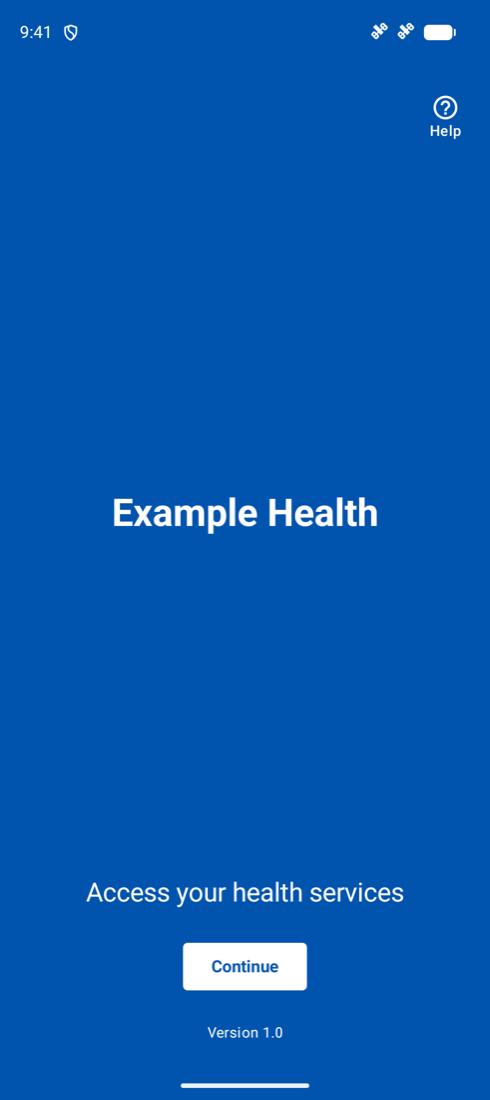
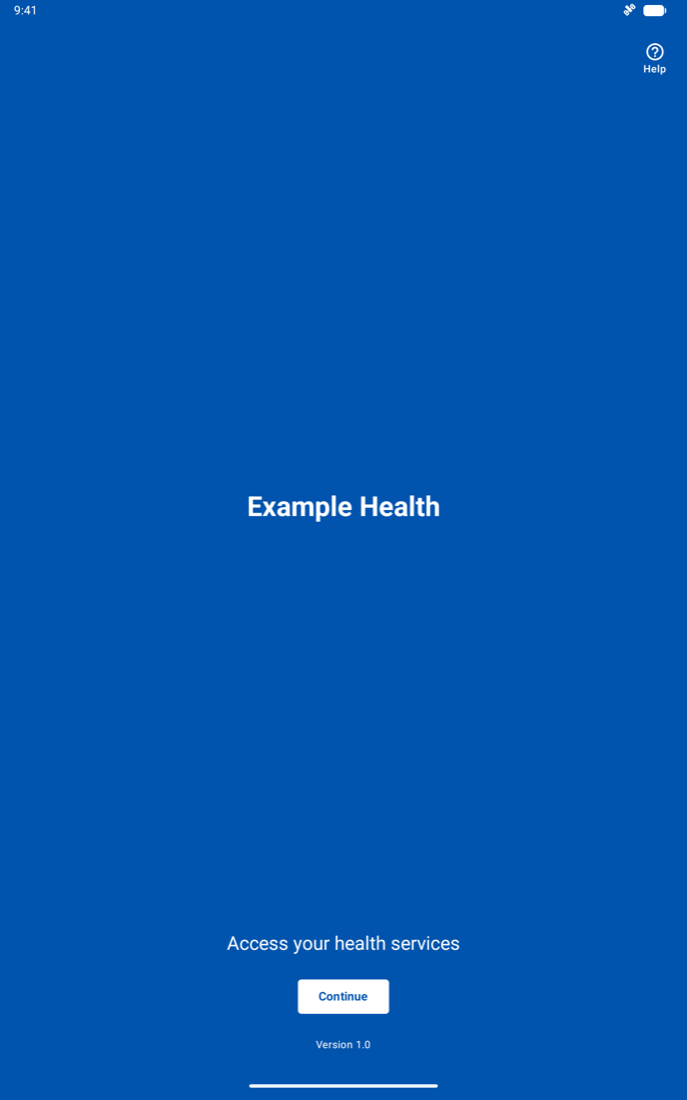
The start screen, then a top bar with the service's name and help, the tab's screens and a
tab bar. Each tab keeps its own stack of screens, and the system Back gesture goes back
within it. The tab bar is drawn here so it matches the service's design, so each tab is
selectable with the Tab role: TalkBack says which is selected, and Messages says how many are unread.
patient-app/src/main/kotlin/com/example/patientapp/AppShell.kt
// The app's frame: the start screen, then a top bar with the service's name and help, the tab's screens, and a tab bar. Each
// tab keeps its own stack of screens; the system Back gesture goes back within it.
package com.example.patientapp

import android.app.Activity
import androidx.activity.compose.BackHandler
import androidx.compose.foundation.background
import androidx.compose.foundation.border
import androidx.compose.foundation.clickable
import androidx.compose.foundation.layout.Arrangement
import androidx.compose.foundation.layout.Box
import androidx.compose.foundation.layout.Column
import androidx.compose.foundation.layout.Row
import androidx.compose.foundation.layout.Spacer
import androidx.compose.foundation.layout.fillMaxSize
import androidx.compose.foundation.layout.fillMaxWidth
import androidx.compose.foundation.layout.heightIn
import androidx.compose.foundation.layout.navigationBarsPadding
import androidx.compose.foundation.layout.padding
import androidx.compose.foundation.layout.size
import androidx.compose.foundation.layout.statusBarsPadding
import androidx.compose.foundation.selection.selectable
import androidx.compose.foundation.selection.selectableGroup
import androidx.compose.foundation.shape.CircleShape
import androidx.compose.foundation.shape.RoundedCornerShape
import androidx.compose.material.icons.Icons
import androidx.compose.material.icons.automirrored.outlined.HelpOutline
import androidx.compose.material.icons.filled.AccountCircle
import androidx.compose.material.icons.filled.Email
import androidx.compose.material.icons.filled.Home
import androidx.compose.material.icons.outlined.AccountCircle
import androidx.compose.material.icons.outlined.Email
import androidx.compose.material.icons.outlined.Home
import androidx.compose.material3.Button
import androidx.compose.material3.ButtonDefaults
import androidx.compose.material3.Icon
import androidx.compose.material3.MaterialTheme
import androidx.compose.material3.Text
import androidx.compose.runtime.Composable
import androidx.compose.runtime.SideEffect
import androidx.compose.runtime.getValue
import androidx.compose.runtime.mutableStateOf
import androidx.compose.runtime.remember
import androidx.compose.runtime.saveable.rememberSaveable
import androidx.compose.runtime.setValue
import androidx.compose.ui.Alignment
import androidx.compose.ui.Modifier
import androidx.compose.ui.platform.LocalView
import androidx.compose.ui.res.pluralStringResource
import androidx.compose.ui.res.stringResource
import androidx.compose.ui.semantics.Role
import androidx.compose.ui.semantics.contentDescription
import androidx.compose.ui.semantics.heading
import androidx.compose.ui.semantics.semantics
import androidx.compose.ui.text.font.FontWeight
import androidx.compose.ui.unit.dp
import androidx.core.view.WindowCompat
import io.github.lilydesignsystem.compose.themes.LocalLilyTokens

enum class Tab { Home, Messages, Profile }

@Composable
fun PatientApp() {
    var started by rememberSaveable { mutableStateOf(false) }
    // White status bar icons on the blue start screen, dark ones on the light screens.
    val view = LocalView.current
    SideEffect {
        val window = (view.context as? Activity)?.window ?: return@SideEffect
        WindowCompat.getInsetsController(window, view).isAppearanceLightStatusBars = started
    }
    if (started) AppShell() else StartScreen { started = true }
}

/** The first screen: the service's name and a button to go on. A real app signs the person in here. */
@Composable
fun StartScreen(start: () -> Unit) {
    val tokens = LocalLilyTokens.current
    Column(
        modifier = Modifier.fillMaxSize().background(tokens.primary).statusBarsPadding().navigationBarsPadding().padding(24.dp),
        horizontalAlignment = Alignment.CenterHorizontally,
        verticalArrangement = Arrangement.spacedBy(24.dp),
    ) {
        Column(
            Modifier.align(Alignment.End).heightIn(min = 48.dp).clickable(role = Role.Button) {},
            horizontalAlignment = Alignment.CenterHorizontally,
        ) {
            Icon(Icons.AutoMirrored.Outlined.HelpOutline, contentDescription = null, tint = tokens.primaryContent)
            Text(stringResource(R.string.help), color = tokens.primaryContent, style = MaterialTheme.typography.labelMedium)
        }
        Spacer(Modifier.weight(1f))
        Text(
            stringResource(R.string.app_name),
            color = tokens.primaryContent,
            style = MaterialTheme.typography.headlineLarge,
            fontWeight = FontWeight.Bold,
            modifier = Modifier.semantics { heading() },
        )
        Spacer(Modifier.weight(1f))
        Text(stringResource(R.string.start_heading), color = tokens.primaryContent, style = MaterialTheme.typography.titleLarge)
        Button(
            onClick = start,
            shape = RoundedCornerShape(4.dp),
            colors = ButtonDefaults.buttonColors(containerColor = tokens.base100, contentColor = tokens.primary),
        ) { Text(stringResource(R.string.continue_label), fontWeight = FontWeight.Bold) }
        Text(stringResource(R.string.version), color = tokens.primaryContent, style = MaterialTheme.typography.bodySmall)
    }
}

@Composable
fun AppShell() {
    var tab by rememberSaveable { mutableStateOf(Tab.Home) }
    val stacks = remember { mutableStateOf(Tab.entries.associateWith { emptyList<Route>() }) }
    val stack = stacks.value.getValue(tab)
    fun open(route: Route) {
        stacks.value = stacks.value + (tab to stack + route)
    }
    fun back() {
        stacks.value = stacks.value + (tab to stack.dropLast(1))
    }
    BackHandler(enabled = stack.isNotEmpty()) { back() }

    Column(Modifier.fillMaxSize().background(LocalLilyTokens.current.base200)) {
        TopBar()
        Box(Modifier.weight(1f)) {
            when (val route = stack.lastOrNull()) {
                null -> when (tab) {
                    Tab.Home -> HomeScreen(::open)
                    Tab.Messages -> MessagesScreen(::open)
                    Tab.Profile -> ProfileScreen(::open)
                }
                Route.Appointments -> AppointmentsScreen(::open, ::back)
                Route.Prescriptions -> PrescriptionsScreen(::open, ::back)
                Route.TestResults -> TestResultsScreen(::open, ::back)
                is Route.NotBuilt -> NotBuilt(route.title, ::back)
            }
        }
        TabBar(tab) { tab = it }
    }
}

/** The service's name, as text (the app's own mark would go here, named for the service), and the help button. */
@Composable
private fun TopBar() {
    val tokens = LocalLilyTokens.current
    Row(
        modifier = Modifier.fillMaxWidth().statusBarsPadding().padding(horizontal = 16.dp, vertical = 4.dp),
        verticalAlignment = Alignment.CenterVertically,
    ) {
        Text(
            stringResource(R.string.app_name),
            color = tokens.primary,
            style = MaterialTheme.typography.titleLarge,
            fontWeight = FontWeight.Bold,
            modifier = Modifier.weight(1f),
        )
        Text(
            stringResource(R.string.app_help),
            color = tokens.primary,
            fontWeight = FontWeight.Bold,
            modifier = Modifier
                .heightIn(min = 48.dp)
                .clickable(role = Role.Button) {}
                .border(1.dp, tokens.base300, RoundedCornerShape(4.dp))
                .padding(horizontal = 10.dp, vertical = 12.dp),
        )
    }
}

/**
 * The tab bar, drawn here so it matches the service's design. Each tab is selectable with the Tab role, so TalkBack says
 * which is selected, and Messages says how many are unread.
 */
@Composable
private fun TabBar(selected: Tab, select: (Tab) -> Unit) {
    val tokens = LocalLilyTokens.current
    val unread = Records.inboxes.sumOf { it.unread }
    val unreadWords = pluralStringResource(R.plurals.unread, unread, unread)
    val tabsLabel = stringResource(R.string.tabs)
    Row(
        Modifier
            .fillMaxWidth()
            .background(tokens.primary)
            .navigationBarsPadding()
            .padding(top = 8.dp)
            .selectableGroup()
            .semantics { contentDescription = tabsLabel },
    ) {
        Tab.entries.forEach { tab ->
            val (label, icon, filled) = when (tab) {
                Tab.Home -> Triple(stringResource(R.string.home), Icons.Outlined.Home, Icons.Filled.Home)
                Tab.Messages -> Triple(stringResource(R.string.messages), Icons.Outlined.Email, Icons.Filled.Email)
                Tab.Profile -> Triple(stringResource(R.string.profile), Icons.Outlined.AccountCircle, Icons.Filled.AccountCircle)
            }
            val isSelected = tab == selected
            val spoken = if (tab == Tab.Messages && unread > 0) "$label, $unreadWords" else label
            Column(
                modifier = Modifier
                    .weight(1f)
                    .heightIn(min = 56.dp)
                    .selectable(selected = isSelected, role = Role.Tab) { select(tab) }
                    .semantics { contentDescription = spoken },
                horizontalAlignment = Alignment.CenterHorizontally,
                verticalArrangement = Arrangement.spacedBy(2.dp),
            ) {
                Box {
                    Icon(if (isSelected) filled else icon, contentDescription = null, tint = tokens.primaryContent)
                    if (tab == Tab.Messages && unread > 0) {
                        Box(Modifier.align(Alignment.TopEnd).size(9.dp).background(tokens.error, CircleShape))
                    }
                }
                Text(
                    label,
                    color = tokens.primaryContent,
                    style = MaterialTheme.typography.labelMedium,
                    fontWeight = if (isSelected) FontWeight.Bold else FontWeight.Normal,
                )
            }
        }
    }
}
Step 7: Start the app
Lily's NHS England patient theme, Material 3 in its colours, and the app's type scale. Any
other theme in LilyTokens works the same way.
patient-app/src/main/kotlin/com/example/patientapp/MainActivity.kt
package com.example.patientapp

import android.os.Bundle
import androidx.activity.ComponentActivity
import androidx.activity.compose.setContent
import androidx.activity.enableEdgeToEdge
import androidx.compose.material3.MaterialTheme
import androidx.compose.material3.lightColorScheme
import androidx.compose.runtime.Composable
import androidx.compose.runtime.CompositionLocalProvider
import androidx.compose.ui.unit.sp
import io.github.lilydesignsystem.compose.LocalLilyTextStyles
import io.github.lilydesignsystem.compose.themes.LilyTheme
import io.github.lilydesignsystem.compose.themes.LilyTokens

class MainActivity : ComponentActivity() {
    override fun onCreate(savedInstanceState: Bundle?) {
        super.onCreate(savedInstanceState)
        enableEdgeToEdge()
        setContent { AppTheme { PatientApp() } }
    }
}

/** Lily's NHS England patient theme, with Material 3's buttons and icons in its colours, and the app's type scale. */
@Composable
fun AppTheme(content: @Composable () -> Unit) {
    val tokens = LilyTokens.nhsEnglandPatients
    LilyTheme(tokens) {
        val styles = LocalLilyTextStyles.current
        MaterialTheme(
            colorScheme = lightColorScheme(
                primary = tokens.primary,
                onPrimary = tokens.primaryContent,
                background = tokens.base200,
                onBackground = tokens.baseContent,
                surface = tokens.base100,
                onSurface = tokens.baseContent,
                onSurfaceVariant = tokens.baseContent,
                outline = tokens.base300,
                error = tokens.error,
            ),
        ) {
            CompositionLocalProvider(
                LocalLilyTextStyles provides styles.copy(body = styles.body.copy(fontSize = 16.sp)),
                content = content,
            )
        }
    }
}
Step 8: Test every screen
An instrumented test that goes where a person goes, with the Accessibility Test Framework checking before every action and each screen as shown, and a screenshot of each kept in the app's files.
patient-app/src/androidTest/kotlin/com/example/patientapp/PatientAppTest.kt
// The seven screens as a person reaches them, on a device or an emulator, with the Accessibility Test Framework checking
// before every action and each screen as shown, and a screenshot of each kept in the app's files.
package com.example.patientapp

import android.graphics.Bitmap
import androidx.compose.ui.test.junit4.accessibility.enableAccessibilityChecks
import androidx.compose.ui.test.junit4.v2.createAndroidComposeRule
import androidx.compose.ui.test.onNodeWithContentDescription
import androidx.compose.ui.test.onNodeWithText
import androidx.compose.ui.test.onRoot
import androidx.compose.ui.test.performClick
import androidx.compose.ui.test.tryPerformAccessibilityChecks
import androidx.test.ext.junit.runners.AndroidJUnit4
import androidx.test.platform.app.InstrumentationRegistry
import java.io.File
import org.junit.Rule
import org.junit.Test
import org.junit.runner.RunWith

@RunWith(AndroidJUnit4::class)
class PatientAppTest {
    @get:Rule val rule = createAndroidComposeRule<MainActivity>()

    private fun check(name: String) {
        rule.waitForIdle()
        rule.onRoot().tryPerformAccessibilityChecks()
        val shot = InstrumentationRegistry.getInstrumentation().uiAutomation.takeScreenshot()
        val dir = File(rule.activity.getExternalFilesDir(null), "screenshots").apply { mkdirs() }
        File(dir, "$name.png").outputStream().use { shot.compress(Bitmap.CompressFormat.PNG, 100, it) }
    }

    @Test fun everyScreen() {
        rule.enableAccessibilityChecks()
        check("1-start")
        rule.onNodeWithText("Continue").performClick()
        check("2-home")
        rule.onNodeWithContentDescription("Messages, 1 unread message").performClick()
        rule.onNodeWithText("You have 4 inboxes").assertExists()
        check("3-messages")
        rule.onNodeWithContentDescription("Profile").performClick()
        check("4-profile")
        rule.onNodeWithContentDescription("Home").performClick()
        rule.onNodeWithText("Appointments").performClick()
        rule.onNodeWithText("GP surgery").assertExists()
        check("5-appointments")
        rule.onNodeWithText("Back").performClick()
        rule.onNodeWithText("Prescriptions").performClick()
        rule.onNodeWithText("Requested medicines").assertExists()
        check("6-prescriptions")
        rule.onNodeWithText("Back").performClick()
        rule.onNodeWithText("Test results").performClick()
        rule.onNodeWithText("GP-ordered test results").assertExists()
        check("7-results")
    }
}
Check your work: with an emulator running, run ./gradlew :patient-app:connectedDebugAndroidTest, then again on a tablet
emulator in portrait. Turn on TalkBack and move through the tab bar: each tab says its
name and whether it is selected, and Messages says "1 unread message".
What this does not do yet
- It signs no one in, and asks no service for records: the start screen's button goes straight in, and the records are examples.
- Most links open a screen that says it is not part of the tutorial; each is where the service would go.
- It has one language. The words are string resources, so adding another touches no code.
Next steps
- .NET MAUI version: the same app in C#, for iPhone, iPad and Android.
- Swift version: the same app on iPhone and iPad.
- Book an appointment in Kotlin: a booking screen behind the Appointments link.