
A patient app in .NET MAUI
The screens of a national health service's patient app, for iPhone, iPad and Android, from one C# project with .NET MAUI and Lily.
What you'll build
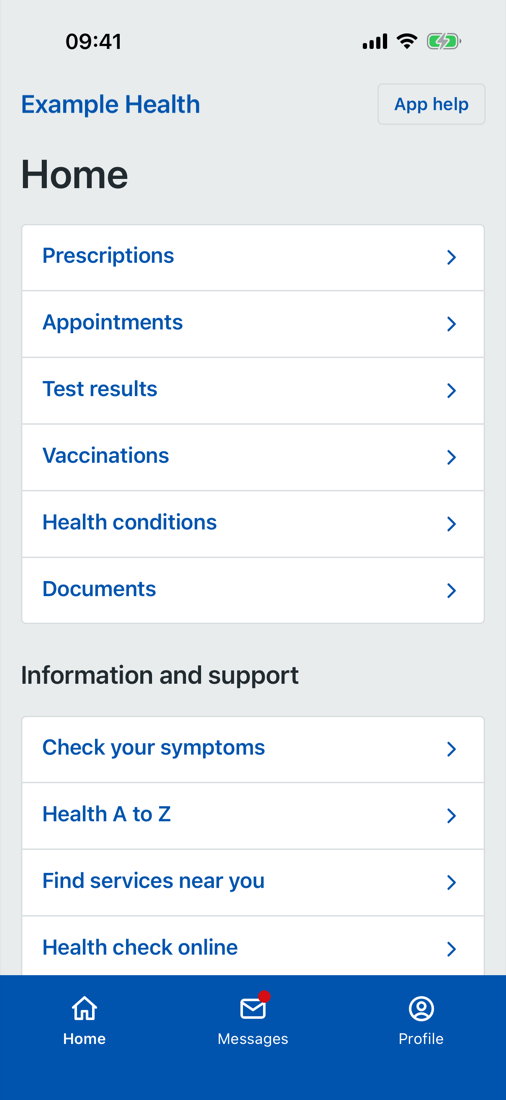
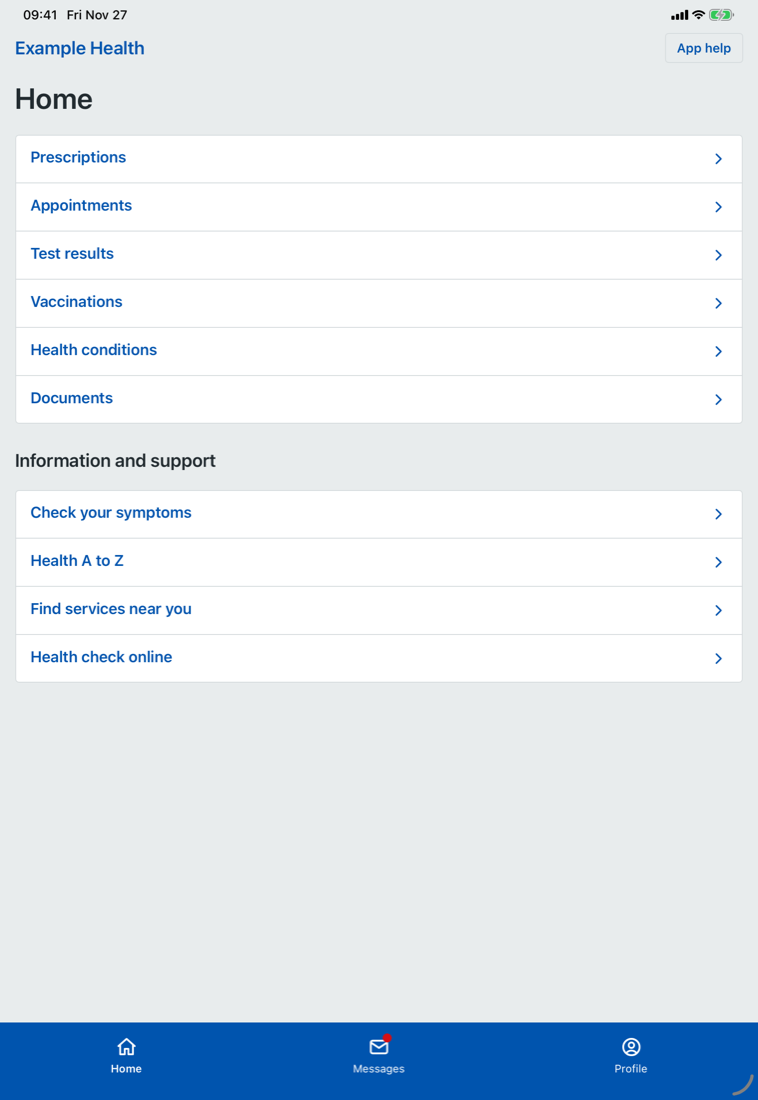
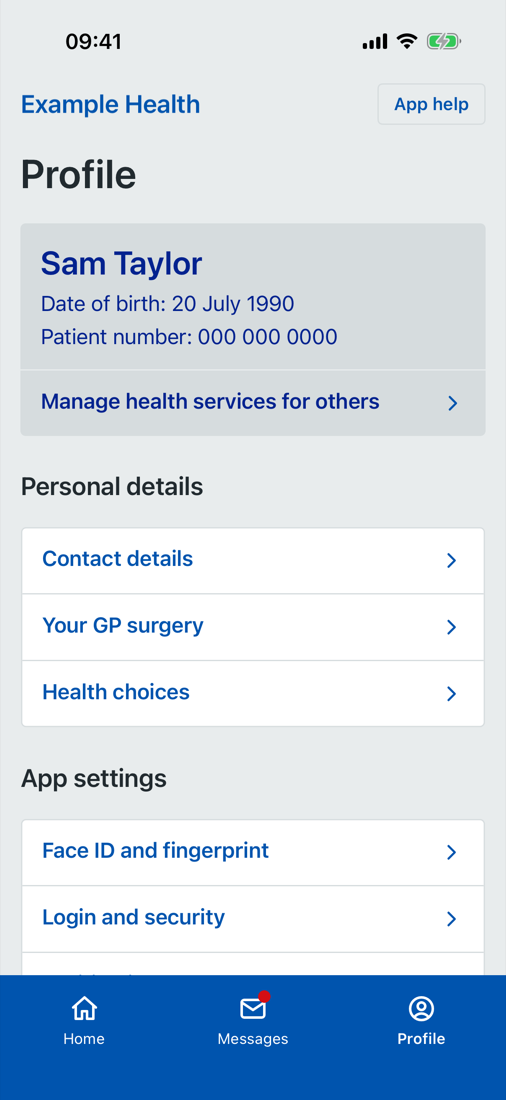
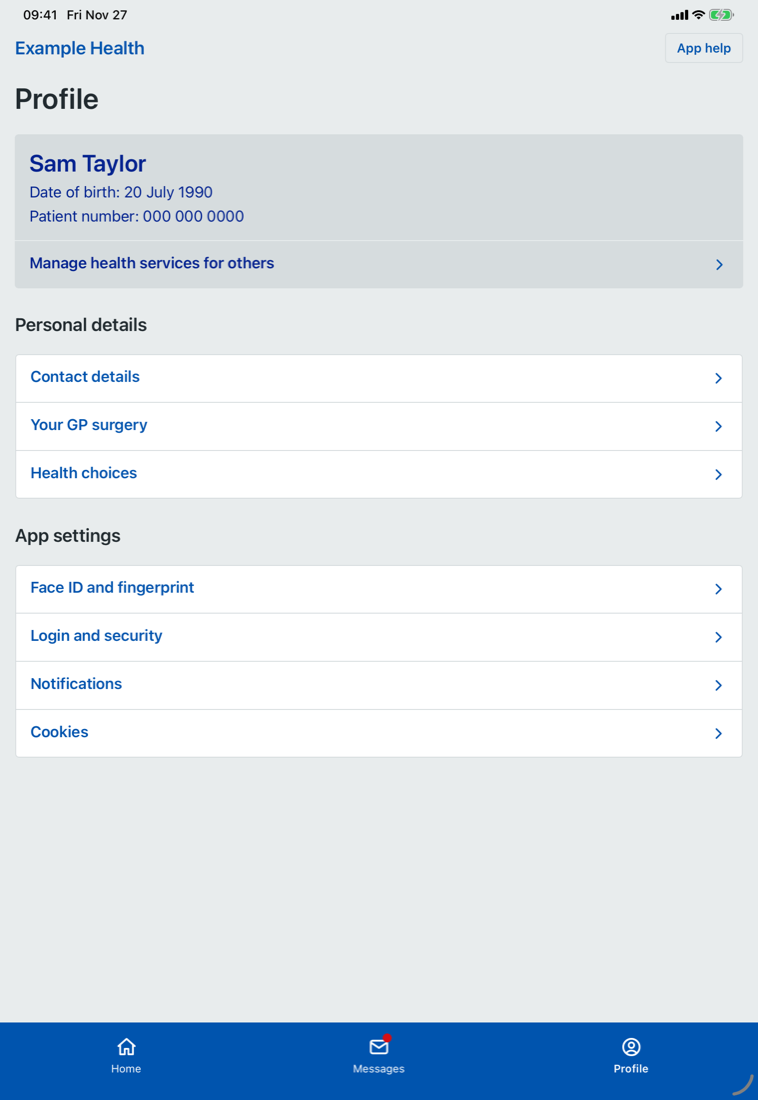
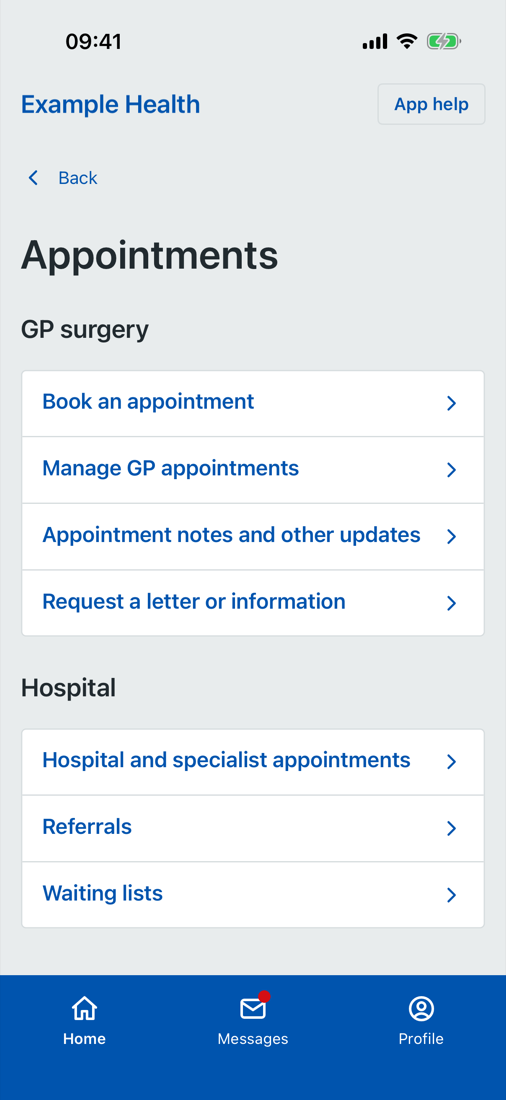
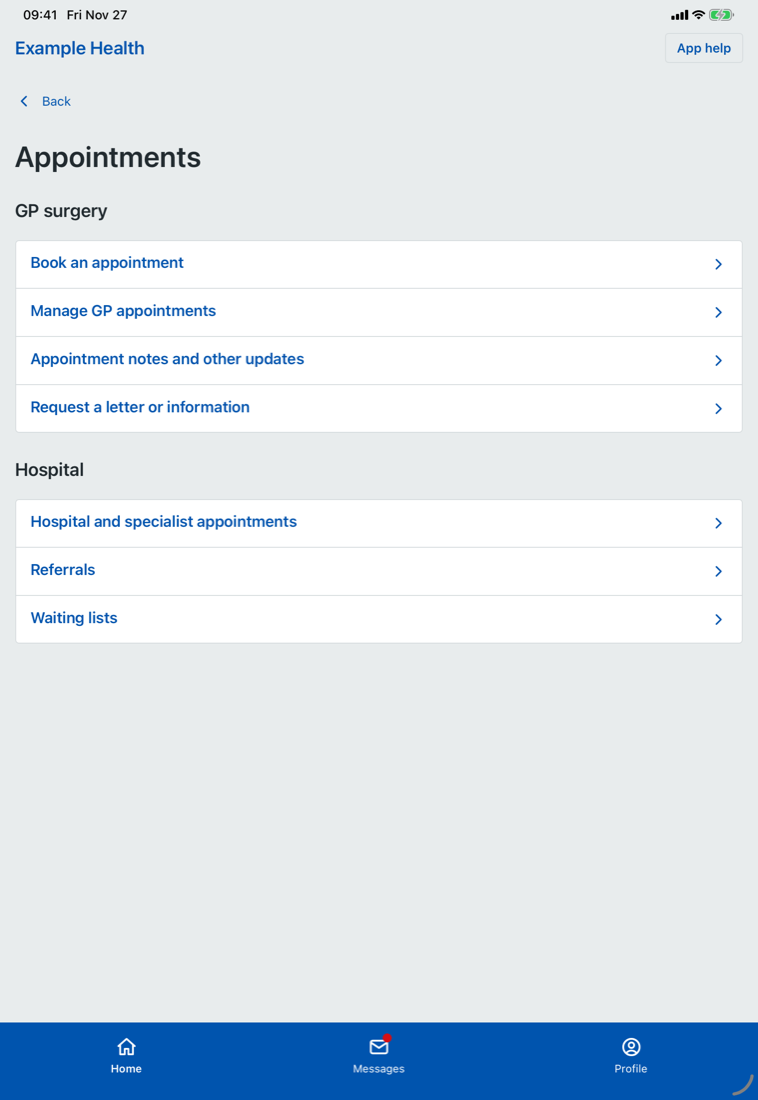
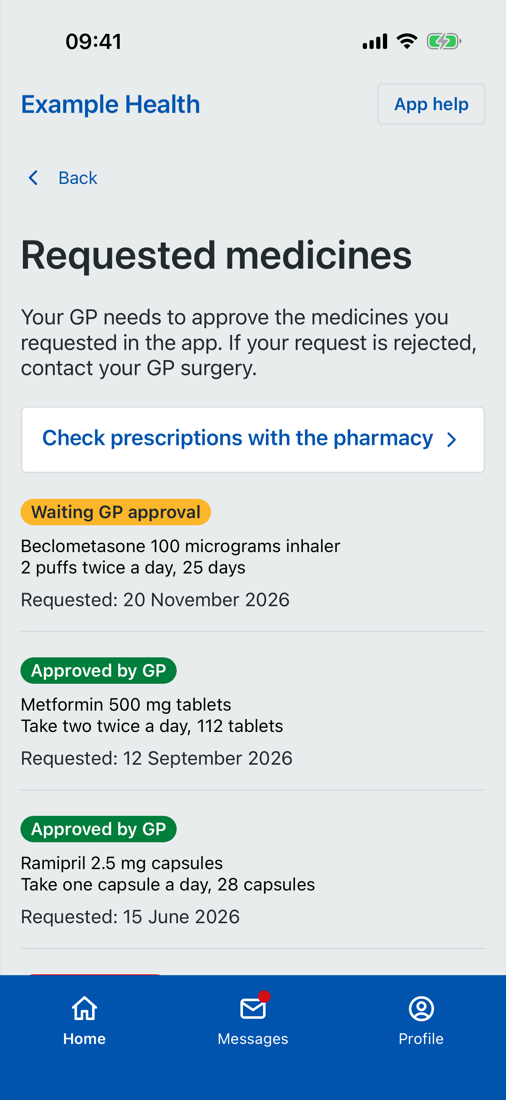
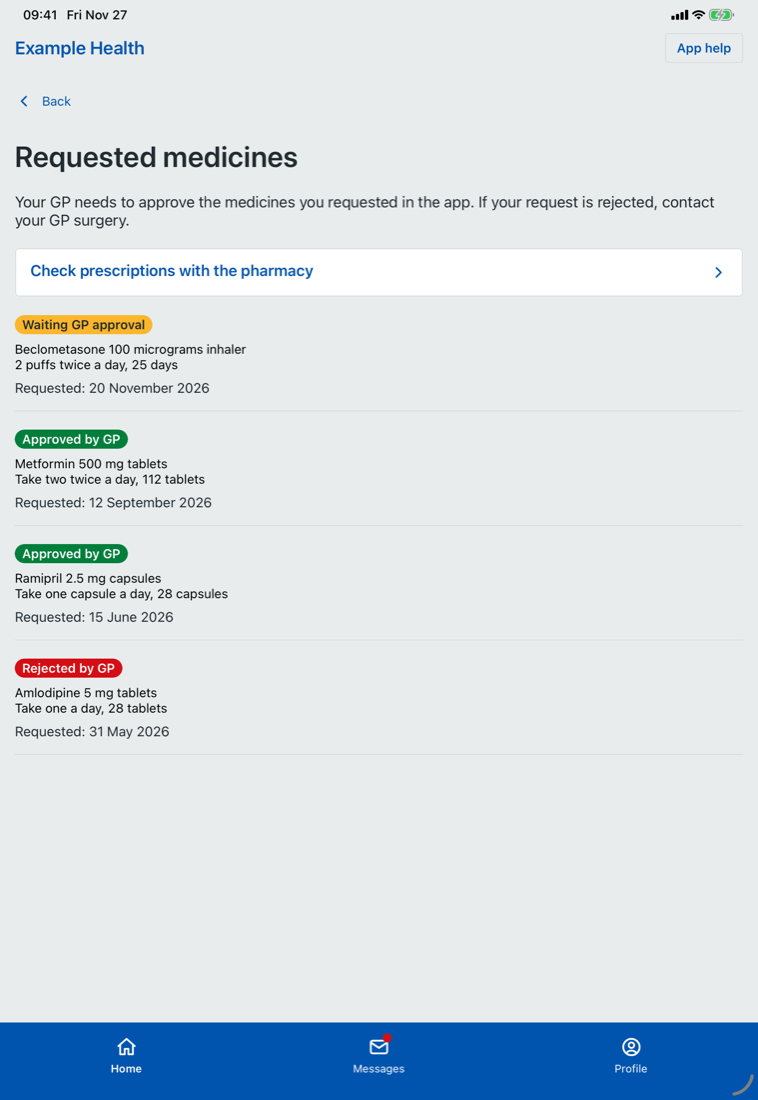
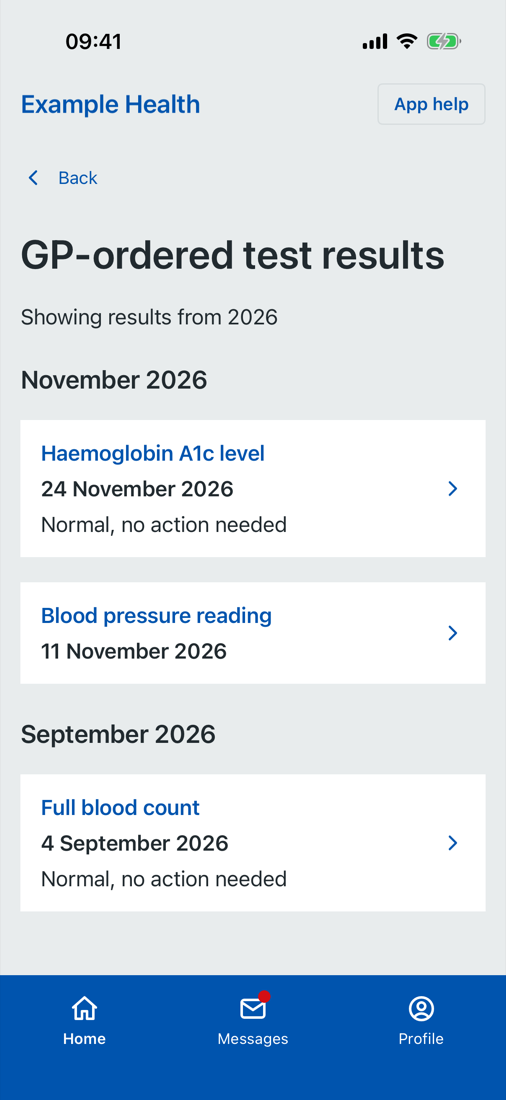
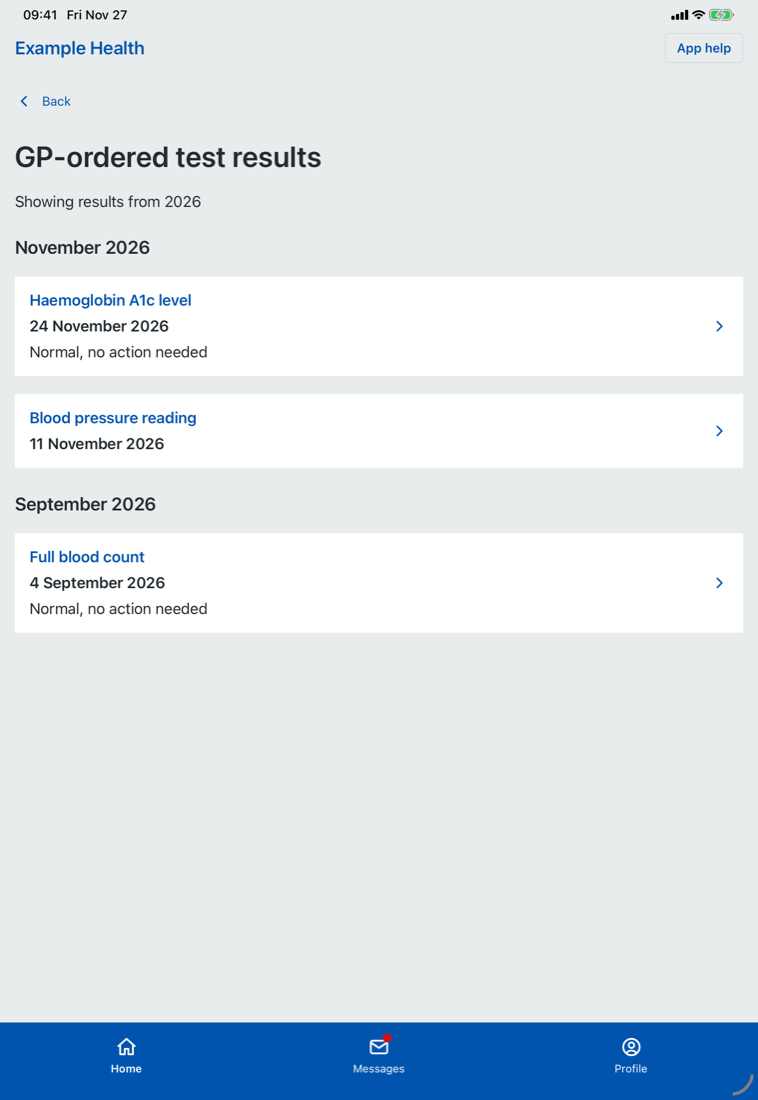
A patient app of the kind public health services publish: a start screen, then home, messages and profile in a tab bar, and from home the appointments, the medicines asked for and the test results. Seven screens, one app for phones and tablets in portrait, with example data for a person who does not exist. About an hour.
Whose look this is
The app wears Lily's NHS England patient theme: its colours, its type and its shapes. It is not the NHS App, and it does not say it is. It has its own name, Example Health, and no NHS name, logo or wordmark. A theme lends a service its look; it never lends it another body's identity, so your app supplies its own name and mark (visual identity). Swap the theme for another, and the same code is another country's app.
Before you start
You need the .NET 11 SDK with the MAUI workload (dotnet workload install maui),
and Xcode for iOS or the Android SDK for Android. LilyDesignSystem.Maui is not on
NuGet yet, so the app references it from a clone of the repository, beside the app:
git clone https://github.com/LilyDesignSystem/lily-design-system
dotnet new maui -n PatientApp
mkdir PatientApp.Tests
cd PatientApp
rm App.xaml App.xaml.cs AppShell.xaml AppShell.xaml.cs MainPage.xaml MainPage.xaml.cs
rm -r Resources/Styles Resources/Images
The app is written in C#, so the template's XAML pages, styles and images go. Each code
block below is one whole file in PatientApp, or in PatientApp.Tests beside it.
Step 1: The project and its icons
The icons are SVG files MAUI turns into images for each platform: white for the dark bars, the theme's primary blue for the chevrons. Each is decoration; the button beside it carries the name.
PatientApp.csproj
<Project Sdk="Microsoft.NET.Sdk">

  <!-- The patient app: seven screens, drawn with Lily's MAUI controls. -->
  <PropertyGroup>
    <TargetFrameworks>net11.0-android;net11.0-ios</TargetFrameworks>
    <OutputType>Exe</OutputType>
    <RootNamespace>PatientApp</RootNamespace>
    <UseMaui>true</UseMaui>
    <SingleProject>true</SingleProject>
    <ImplicitUsings>enable</ImplicitUsings>
    <Nullable>enable</Nullable>
    <ApplicationTitle>Example Health</ApplicationTitle>
    <ApplicationId>com.example.patientapp</ApplicationId>
    <ApplicationDisplayVersion>1.0</ApplicationDisplayVersion>
    <ApplicationVersion>1</ApplicationVersion>
    <SupportedOSPlatformVersion Condition="$([MSBuild]::GetTargetPlatformIdentifier('$(TargetFramework)')) == 'ios'">17.0</SupportedOSPlatformVersion>
    <SupportedOSPlatformVersion Condition="$([MSBuild]::GetTargetPlatformIdentifier('$(TargetFramework)')) == 'android'">24.0</SupportedOSPlatformVersion>
  </PropertyGroup>

  <ItemGroup>
    <MauiIcon Include="Resources\AppIcon\appicon.svg" ForegroundFile="Resources\AppIcon\appiconfg.svg" Color="#0054AE" />
    <MauiSplashScreen Include="Resources\Splash\splash.svg" Color="#0054AE" BaseSize="128,128" />
    <MauiImage Include="Resources\Images\*.svg" />
  </ItemGroup>

  <ItemGroup>
    <PackageReference Include="Microsoft.Maui.Controls" Version="11.0.10" />
  </ItemGroup>

  <ItemGroup>
    <!-- Until LilyDesignSystem.Maui is on NuGet: a project reference into your clone of the monorepo. -->
    <ProjectReference Include="../lily-design-system/lily-design-system-maui/src/LilyDesignSystem.Maui/LilyDesignSystem.Maui.csproj" />
  </ItemGroup>

</Project>
Resources/Images/home.svg
<svg xmlns="http://www.w3.org/2000/svg" viewBox="0 0 24 24" width="24" height="24" fill="none" stroke="#FFFFFF" stroke-width="2" stroke-linecap="round" stroke-linejoin="round"><path d="M3 11 12 3l9 8"/><path d="M5 10v10h5v-6h4v6h5V10"/></svg>Resources/Images/messages.svg
<svg xmlns="http://www.w3.org/2000/svg" viewBox="0 0 24 24" width="24" height="24" fill="none" stroke="#FFFFFF" stroke-width="2" stroke-linecap="round" stroke-linejoin="round"><rect x="3" y="5" width="18" height="14" rx="2"/><path d="m3 7 9 6 9-6"/></svg>Resources/Images/profile.svg
<svg xmlns="http://www.w3.org/2000/svg" viewBox="0 0 24 24" width="24" height="24" fill="none" stroke="#FFFFFF" stroke-width="2" stroke-linecap="round" stroke-linejoin="round"><circle cx="12" cy="12" r="9"/><circle cx="12" cy="10" r="3"/><path d="M6.5 18.5a7 7 0 0 1 11 0"/></svg>Resources/Images/help.svg
<svg xmlns="http://www.w3.org/2000/svg" viewBox="0 0 24 24" width="24" height="24" fill="none" stroke="#FFFFFF" stroke-width="2" stroke-linecap="round" stroke-linejoin="round"><circle cx="12" cy="12" r="9"/><path d="M9.5 9.5a2.5 2.5 0 1 1 3.5 2.3c-.6.3-1 .9-1 1.6v.6"/><path d="M12 17h.01"/></svg>Resources/Images/chevron.svg
<svg xmlns="http://www.w3.org/2000/svg" viewBox="0 0 24 24" width="20" height="20" fill="none" stroke="#0054AE" stroke-width="2" stroke-linecap="round" stroke-linejoin="round"><path d="m9 6 6 6-6 6"/></svg>Resources/Images/back.svg
<svg xmlns="http://www.w3.org/2000/svg" viewBox="0 0 24 24" width="20" height="20" fill="none" stroke="#0054AE" stroke-width="2" stroke-linecap="round" stroke-linejoin="round"><path d="m15 6-6 6 6 6"/></svg>Step 2: Write the words
Every word the app shows is in one file, so translating the app touches no page. A count that changes its words, such as "1 unread message", is a function the app owns: Lily never builds a sentence.
Words.cs
namespace PatientApp;

/// <summary>Every word the app shows, in one place, so the app can be translated without touching a page.</summary>
public static class Words
{
    /// <summary>The language the app writes dates in.</summary>
    public const string Locale = "en-GB";
    public const string AppName = "Example Health";
    public const string Help = "Help";
    public const string AppHelp = "App help";
    public const string StartHeading = "Access your health services";
    public const string Continue = "Continue";
    public const string Version = "Version 1.0";
    public const string Back = "Back";
    public const string Home = "Home";
    public const string Messages = "Messages";
    public const string Profile = "Profile";
    public static string Selected(string tab) => $"{tab}, selected";
    public static string Unread(int count) => count == 1 ? "1 unread message" : $"{count} unread messages";

    public const string Prescriptions = "Prescriptions";
    public const string Appointments = "Appointments";
    public const string TestResults = "Test results";
    public const string Vaccinations = "Vaccinations";
    public const string HealthConditions = "Health conditions";
    public const string Documents = "Documents";
    public const string Support = "Information and support";
    public const string Symptoms = "Check your symptoms";
    public const string HealthAToZ = "Health A to Z";
    public const string ServicesNearYou = "Find services near you";
    public const string HealthCheck = "Health check online";

    public static string InboxCount(int count) => count == 1 ? "You have 1 inbox" : $"You have {count} inboxes";

    public static string DateOfBirth(string date) => $"Date of birth: {date}";
    public static string PatientNumber(string number) => $"Patient number: {number}";
    public const string OthersServices = "Manage health services for others";
    public const string PersonalDetails = "Personal details";
    public const string ContactDetails = "Contact details";
    public const string YourSurgery = "Your GP surgery";
    public const string HealthChoices = "Health choices";
    public const string AppSettings = "App settings";
    public const string Biometrics = "Face ID and fingerprint";
    public const string LoginSecurity = "Login and security";
    public const string Notifications = "Notifications";
    public const string Cookies = "Cookies";

    public const string GpSurgery = "GP surgery";
    public const string BookAppointment = "Book an appointment";
    public const string ManageAppointments = "Manage GP appointments";
    public const string AppointmentNotes = "Appointment notes and other updates";
    public const string RequestLetter = "Request a letter or information";
    public const string Hospital = "Hospital";
    public const string HospitalAppointments = "Hospital and specialist appointments";
    public const string Referrals = "Referrals";
    public const string WaitingLists = "Waiting lists";

    public const string RequestedMedicines = "Requested medicines";
    public const string RequestedIntro = "Your GP needs to approve the medicines you requested in the app. If your request is rejected, contact your GP surgery.";
    public const string CheckPharmacy = "Check prescriptions with the pharmacy";
    public static string Status(string words) => $"Status: {words}";
    public static string Requested(string date) => $"Requested: {date}";
    public static string StatusWords(RequestStatus status) => status switch
    {
        RequestStatus.Waiting => "Waiting GP approval",
        RequestStatus.Approved => "Approved by GP",
        _ => "Rejected by GP",
    };

    public const string ResultsHeading = "GP-ordered test results";
    public static string ShowingFrom(string year) => $"Showing results from {year}";

    public const string NotBuilt = "This screen is not part of the tutorial. Its link shows where it would go.";
}
Step 3: The records, with tests
A real app asks its service for these after the person signs in. A date in a record is a
calendar date, so it is a DateOnly, which has no time zone to move it a day.
The tests build the app's own Records.cs and Words.cs on plain .NET,
with no device.
Records.cs
using System.Globalization;

namespace PatientApp;

// The patient's records: example data for a person who does not exist. A real app asks its service for them, after sign-in.

public enum RequestStatus { Waiting, Approved, Rejected }

public sealed record Inbox(string Title, string Intro, string[] Topics, int Unread);

/// <summary>Requested is YYYY-MM-DD: a calendar date, not a moment.</summary>
public sealed record MedicineRequest(string Name, string Directions, string Requested, RequestStatus Status);

/// <summary>Date is YYYY-MM-DD; Comment is the clinician's, when there is one.</summary>
public sealed record TestResult(string Name, string Date, string? Comment);

public static class Records
{
    public const string Name = "Sam Taylor";
    public const string BirthDate = "1990-07-20";
    public const string PatientNumber = "000 000 0000";

    public static readonly Inbox[] Inboxes =
    [
        new("Your healthcare services", "You may receive messages:",
            ["from your GP surgery", "about hospital and specialist appointments", "about invitations and reminders"], 1),
        new("Your hospital and specialist doctors", "You may send or receive messages about:",
            ["your health record", "documents and letters", "questionnaires before an appointment"], 0),
        new("Replies to your GP requests", "You may receive replies to questions you sent about:",
            ["your health", "admin, such as a fit note"], 0),
        new("Practice messaging", "Send and view messages from staff at your GP surgery", [], 0),
    ];

    public static readonly MedicineRequest[] Requests =
    [
        new("Beclometasone 100 micrograms inhaler", "2 puffs twice a day, 25 days", "2026-11-20", RequestStatus.Waiting),
        new("Metformin 500 mg tablets", "Take two twice a day, 112 tablets", "2026-09-12", RequestStatus.Approved),
        new("Ramipril 2.5 mg capsules", "Take one capsule a day, 28 capsules", "2026-06-15", RequestStatus.Approved),
        new("Amlodipine 5 mg tablets", "Take one a day, 28 tablets", "2026-05-31", RequestStatus.Rejected),
    ];

    public static readonly TestResult[] Results =
    [
        new("Haemoglobin A1c level", "2026-11-24", "Normal, no action needed"),
        new("Blood pressure reading", "2026-11-11", null),
        new("Full blood count", "2026-09-04", "Normal, no action needed"),
    ];

    /// <summary>How many messages are unread across the inboxes.</summary>
    public static int Unread => Inboxes.Sum(i => i.Unread);

    /// <summary>The results grouped by the month they were taken, in the order given (newest first).</summary>
    public static IEnumerable<(string Month, TestResult[] Results)> ByMonth(string locale) =>
        Results.GroupBy(r => Dates.Month(r.Date, locale)).Select(g => (g.Key, g.ToArray()));
}

/// <summary>Dates as the app's readers write them. DateOnly has no time zone to move a record's date a day.</summary>
public static class Dates
{
    private static DateOnly Parse(string iso) => DateOnly.ParseExact(iso, "yyyy-MM-dd", CultureInfo.InvariantCulture);

    public static string Long(string iso, string locale) => Parse(iso).ToString("d MMMM yyyy", CultureInfo.GetCultureInfo(locale));

    public static string Month(string iso, string locale) => Parse(iso).ToString("MMMM yyyy", CultureInfo.GetCultureInfo(locale));
}
PatientApp.Tests/PatientApp.Tests.csproj
<Project Sdk="Microsoft.NET.Sdk">

  <!-- The records' rules, tested on plain .NET with no device: the app's own Records.cs and Words.cs. -->
  <PropertyGroup>
    <TargetFramework>net11.0</TargetFramework>
    <ImplicitUsings>enable</ImplicitUsings>
    <Nullable>enable</Nullable>
    <IsPackable>false</IsPackable>
  </PropertyGroup>

  <ItemGroup>
    <Using Include="Xunit" />
  </ItemGroup>

  <ItemGroup>
    <Compile Include="../PatientApp/Records.cs" />
    <Compile Include="../PatientApp/Words.cs" />
  </ItemGroup>

  <ItemGroup>
    <PackageReference Include="Microsoft.NET.Test.Sdk" Version="18.11.1" />
    <PackageReference Include="xunit" Version="2.9.3" />
    <PackageReference Include="xunit.runner.visualstudio" Version="4.0.1" />
  </ItemGroup>

</Project>
PatientApp.Tests/RecordsTests.cs
using PatientApp;

namespace PatientApp.Tests;

// The records' rules, checked without a device.
public class RecordsTests
{
    [Fact]
    public void DatesAreWrittenAsTheAppsReadersWriteThem()
    {
        Assert.Equal("20 July 1990", Dates.Long("1990-07-20", "en-GB"));
        Assert.Equal("November 2026", Dates.Month("2026-11-24", "en-GB"));
    }

    [Fact]
    public void ResultsAreGroupedByMonthNewestFirst()
    {
        var months = Records.ByMonth("en-GB").ToArray();
        Assert.Equal(["November 2026", "September 2026"], months.Select(m => m.Month));
        Assert.Equal(2, months[0].Results.Length);
    }

    [Fact]
    public void TheUnreadCountIsSaidInWords()
    {
        Assert.Equal(1, Records.Unread);
        Assert.Equal("1 unread message", Words.Unread(1));
        Assert.Equal("3 unread messages", Words.Unread(3));
    }

    [Fact]
    public void EveryStatusHasItsWords()
    {
        var statuses = Enum.GetValues<RequestStatus>();
        Assert.All(statuses, s => Assert.False(string.IsNullOrWhiteSpace(Words.StatusWords(s))));
        Assert.Equal(statuses.Length, statuses.Select(Words.StatusWords).Distinct().Count());
    }
}
Check your work: from the folder above the app, run dotnet test PatientApp.Tests. All four tests pass.
Step 4: The parts every screen shares
A screen with its heading and, when it was opened from another, a Back button; a section heading; the link list; a Lily card that opens something; and a Lily badge in its kind's colour pair, taken from the theme's tokens, never from a literal. A MAUI button cannot left-align its text, so each row is its words and a chevron with a transparent button over the whole row: the button carries the name and the button trait for VoiceOver and TalkBack, and the visible words are hidden from them, so nothing is read twice.
Parts.cs
using LilyDesignSystem.Maui;
using LilyDesignSystem.Maui.Themes;

namespace PatientApp;

/// <summary>The parts every screen shares. Colours come from the theme's tokens, never from a literal.</summary>
public static class Parts
{
    public static LilyTokens Tokens => LilyTokens.NhsEnglandPatients;

    /// <summary>One screen: a Back button when it was opened from another, its heading, and its content, scrolling.</summary>
    public static View Screen(string title, Action? back, params View[] content)
    {
        var stack = new VerticalStackLayout { Spacing = 20, Padding = new Thickness(16) };
        if (back is not null)
        {
            var button = new Button
            {
                Text = Words.Back,
                ImageSource = "back.png",
                TextColor = Tokens.Primary,
                BackgroundColor = Colors.Transparent,
                HorizontalOptions = LayoutOptions.Start,
                Padding = new Thickness(0),
                MinimumHeightRequest = 44,
            };
            button.Clicked += (_, _) => back();
            stack.Children.Add(button);
        }
        var heading = new Label { Text = title, FontSize = 32, FontAttributes = FontAttributes.Bold, TextColor = Tokens.BaseContent };
        SemanticProperties.SetHeadingLevel(heading, SemanticHeadingLevel.Level1);
        stack.Children.Add(heading);
        foreach (var view in content) stack.Children.Add(view);
        return new ScrollView { Content = stack, BackgroundColor = Tokens.Base200 };
    }

    public static Label Text(string text, double size = 17, bool bold = false, Color? color = null) => new()
    {
        Text = text,
        FontSize = size,
        FontAttributes = bold ? FontAttributes.Bold : FontAttributes.None,
        TextColor = color ?? Tokens.BaseContent,
    };

    /// <summary>A section's heading inside a screen.</summary>
    public static View SectionHeading(string text)
    {
        var label = Text(text, 20, bold: true);
        label.Margin = new Thickness(0, 8, 0, 0);
        SemanticProperties.SetHeadingLevel(label, SemanticHeadingLevel.Level2);
        return label;
    }

    /// <summary>
    /// A row that opens something: its words and a chevron, with a transparent button over the whole row. A MAUI button
    /// cannot left-align its text, so the button carries the name and the trait, and the visible label and chevron are
    /// hidden from the screen reader.
    /// </summary>
    public static View Row(View look, string name, Action open)
    {
        AutomationProperties.SetIsInAccessibleTree(look, false);
        var button = new Button { BackgroundColor = Colors.Transparent, BorderWidth = 0, CornerRadius = 0 };
        SemanticProperties.SetDescription(button, name);
        button.Clicked += (_, _) => open();
        return new Grid { MinimumHeightRequest = 52, Children = { look, button } };
    }

    private static View Chevron(Color? tint = null) => new Image
    {
        Source = "chevron.png",
        WidthRequest = 20,
        HeightRequest = 20,
        VerticalOptions = LayoutOptions.Center,
    };

    /// <summary>Links in a white box, one a row, each with a chevron: the app's way into each service.</summary>
    public static View LinkList(params (string Title, Action Open)[] rows)
    {
        var list = new VerticalStackLayout();
        for (var i = 0; i < rows.Length; i++)
        {
            if (i > 0) list.Children.Add(new BoxView { HeightRequest = 1, Color = Tokens.Base300 });
            var (title, open) = rows[i];
            var look = new Grid
            {
                Padding = new Thickness(16, 14),
                ColumnDefinitions = [new ColumnDefinition(GridLength.Star), new ColumnDefinition(GridLength.Auto)],
            };
            look.Add(Text(title, bold: true, color: Tokens.Primary), 0);
            look.Add(Chevron(), 1);
            list.Children.Add(Row(look, title, open));
        }
        return new Border
        {
            Content = list,
            BackgroundColor = Tokens.Base100,
            Stroke = Tokens.Base300,
            StrokeShape = new Microsoft.Maui.Controls.Shapes.RoundRectangle { CornerRadius = Tokens.RadiusBox },
        };
    }

    /// <summary>A Lily card that opens something, with a chevron at its end.</summary>
    public static View CardLink(string name, Action open, params View[] content)
    {
        var body = new VerticalStackLayout { Spacing = 8 };
        foreach (var view in content) body.Children.Add(view);
        var look = new Grid { ColumnDefinitions = [new ColumnDefinition(GridLength.Star), new ColumnDefinition(GridLength.Auto)] };
        look.Add(body, 0);
        look.Add(Chevron(), 1);
        var card = new LilyCard { Body = look, Padding = new Thickness(16), BackgroundColor = Tokens.Base100 };
        return Row(card, name, open);
    }

    /// <summary>A Lily badge in its kind's colour pair: the colour is never the only cue, the words are the badge.</summary>
    public static View Badge(string text, BadgeKind kind, string? label = null)
    {
        var (fill, ink) = kind switch
        {
            BadgeKind.Success => (Tokens.Success, Tokens.SuccessContent),
            BadgeKind.Warning => (Tokens.Warning, Tokens.WarningContent),
            BadgeKind.Error => (Tokens.Error, Tokens.ErrorContent),
            _ => (Tokens.Info, Tokens.InfoContent),
        };
        var badge = new LilyBadge
        {
            Text = text,
            Kind = kind,
            Label = label,
            TextColor = ink,
            FontSize = 14,
            FontAttributes = FontAttributes.Bold,
            Padding = new Thickness(8, 2),
        };
        return new Border
        {
            Content = badge,
            BackgroundColor = fill,
            StrokeThickness = 0,
            HorizontalOptions = LayoutOptions.Start,
            StrokeShape = new Microsoft.Maui.Controls.Shapes.RoundRectangle { CornerRadius = 12 },
        };
    }

    /// <summary>The screen behind a link this tutorial does not build.</summary>
    public static View NotBuilt(string title, Action back) => Screen(title, back, Text(Words.NotBuilt));
}
Step 5: The screens
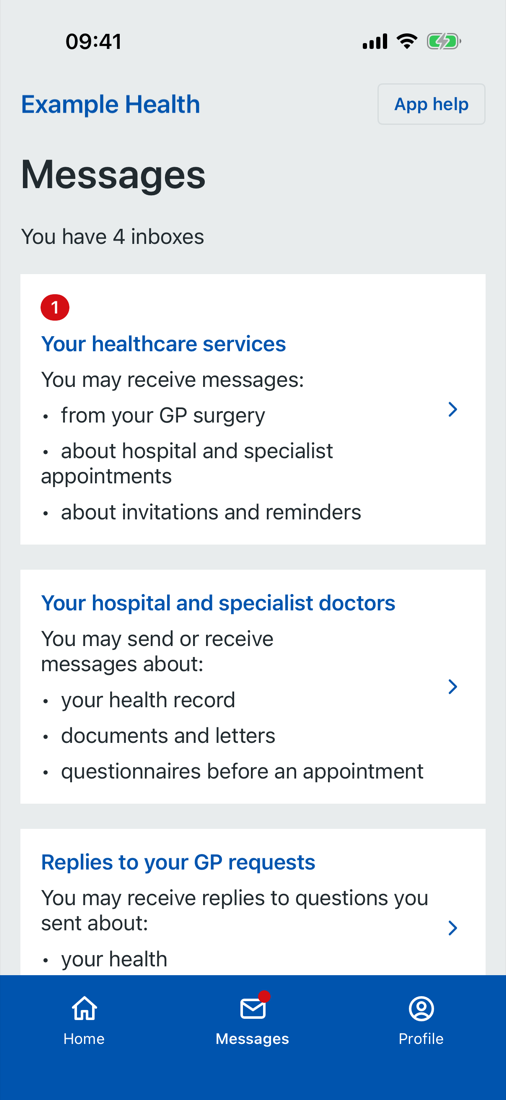
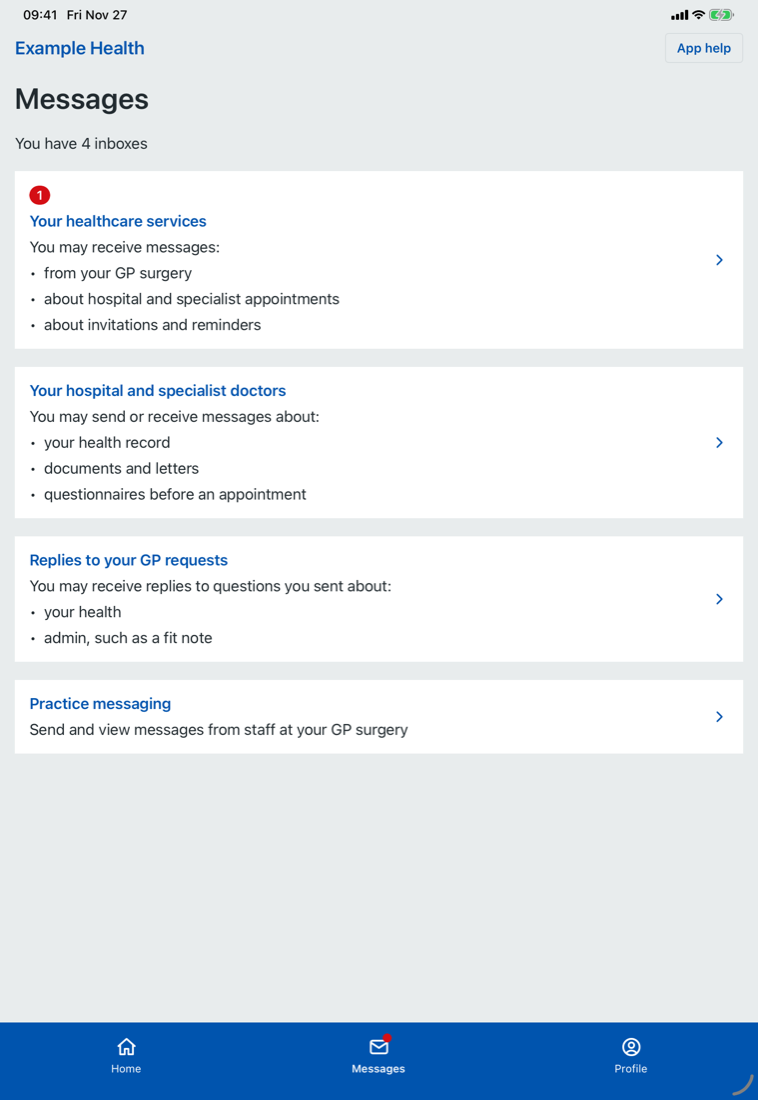
Each screen gets open, to go to another screen in its tab, and back when it was opened from one. Messages gives each unread count as a Lily LilyBadge, which the screen reader says as "1 unread message"; Requested
medicines gives each request's status as a badge in words and each medicine as a Lily MedicationView.
Screens.cs
using LilyDesignSystem.Maui;
using static PatientApp.Parts;

namespace PatientApp;

/// <summary>The screens. Each gets open, to go to another screen in its tab, and back when it was opened from one.</summary>
public static class Screens
{
    private static (string, Action) Later(Action<Func<Action, View>> open, string title) =>
        (title, () => open(back => NotBuilt(title, back)));

    public static View Home(Action<Func<Action, View>> open) => Screen(Words.Home, null,
        LinkList(
            (Words.Prescriptions, () => open(back => Prescriptions(open, back))),
            (Words.Appointments, () => open(back => Appointments(open, back))),
            (Words.TestResults, () => open(back => Results(open, back))),
            Later(open, Words.Vaccinations),
            Later(open, Words.HealthConditions),
            Later(open, Words.Documents)),
        SectionHeading(Words.Support),
        LinkList(Later(open, Words.Symptoms), Later(open, Words.HealthAToZ), Later(open, Words.ServicesNearYou), Later(open, Words.HealthCheck)));

    /// <summary>The inboxes, each a card that opens it. An unread count is a Lily badge, read in words.</summary>
    public static View Messages(Action<Func<Action, View>> open)
    {
        var views = new List<View> { Text(Words.InboxCount(Records.Inboxes.Length)) };
        foreach (var inbox in Records.Inboxes)
        {
            var content = new List<View>();
            if (inbox.Unread > 0) content.Add(Badge(inbox.Unread.ToString(), BadgeKind.Error, Words.Unread(inbox.Unread)));
            content.Add(Text(inbox.Title, bold: true, color: Tokens.Primary));
            content.Add(Text(inbox.Intro));
            content.AddRange(inbox.Topics.Select(topic => Text($"•  {topic}")));
            var name = inbox.Unread > 0 ? $"{inbox.Title}, {Words.Unread(inbox.Unread)}" : inbox.Title;
            views.Add(CardLink(name, () => open(back => NotBuilt(inbox.Title, back)), [.. content]));
        }
        return Screen(Words.Messages, null, [.. views]);
    }

    public static View Profile(Action<Func<Action, View>> open)
    {
        // The person the app is about: their name, date of birth and number, read as one group.
        var name = Text(Records.Name, 26, bold: true, color: Tokens.Secondary);
        SemanticProperties.SetHeadingLevel(name, SemanticHeadingLevel.Level2);
        var person = new VerticalStackLayout
        {
            Spacing = 6,
            Padding = new Thickness(16),
            Children =
            {
                name,
                Text(Words.DateOfBirth(Dates.Long(Records.BirthDate, Words.Locale)), color: Tokens.Secondary),
                Text(Words.PatientNumber(Records.PatientNumber), color: Tokens.Secondary),
            },
        };
        var others = new Grid
        {
            Padding = new Thickness(16, 14),
            ColumnDefinitions = [new ColumnDefinition(GridLength.Star), new ColumnDefinition(GridLength.Auto)],
        };
        others.Add(Text(Words.OthersServices, bold: true, color: Tokens.Secondary), 0);
        others.Add(new Image { Source = "chevron.png", WidthRequest = 20, HeightRequest = 20 }, 1);
        var panel = new Border
        {
            BackgroundColor = Tokens.Base300,
            StrokeThickness = 0,
            StrokeShape = new Microsoft.Maui.Controls.Shapes.RoundRectangle { CornerRadius = Tokens.RadiusBox },
            Content = new VerticalStackLayout
            {
                Children =
                {
                    person,
                    new BoxView { HeightRequest = 1, Color = Tokens.Base200 },
                    Row(others, Words.OthersServices, () => open(back => NotBuilt(Words.OthersServices, back))),
                },
            },
        };
        return Screen(Words.Profile, null,
            panel,
            SectionHeading(Words.PersonalDetails),
            LinkList(Later(open, Words.ContactDetails), Later(open, Words.YourSurgery), Later(open, Words.HealthChoices)),
            SectionHeading(Words.AppSettings),
            LinkList(Later(open, Words.Biometrics), Later(open, Words.LoginSecurity), Later(open, Words.Notifications), Later(open, Words.Cookies)));
    }

    public static View Appointments(Action<Func<Action, View>> open, Action back) => Screen(Words.Appointments, back,
        SectionHeading(Words.GpSurgery),
        LinkList(Later(open, Words.BookAppointment), Later(open, Words.ManageAppointments), Later(open, Words.AppointmentNotes),
            Later(open, Words.RequestLetter)),
        SectionHeading(Words.Hospital),
        LinkList(Later(open, Words.HospitalAppointments), Later(open, Words.Referrals), Later(open, Words.WaitingLists)));

    /// <summary>The medicines asked for, newest first, each with its status in words: a Lily badge.</summary>
    public static View Prescriptions(Action<Func<Action, View>> open, Action back)
    {
        var views = new List<View> { Text(Words.RequestedIntro), LinkList(Later(open, Words.CheckPharmacy)) };
        foreach (var request in Records.Requests)
        {
            var words = Words.StatusWords(request.Status);
            var kind = request.Status switch
            {
                RequestStatus.Waiting => BadgeKind.Warning,
                RequestStatus.Approved => BadgeKind.Success,
                _ => BadgeKind.Error,
            };
            views.Add(new VerticalStackLayout
            {
                Spacing = 8,
                Children =
                {
                    Badge(words, kind, Words.Status(words)),
                    new MedicationView { Name = request.Name, DosageText = request.Directions },
                    Text(Words.Requested(Dates.Long(request.Requested, Words.Locale)), 15),
                    new BoxView { HeightRequest = 1, Color = Tokens.Base300, Margin = new Thickness(0, 8, 0, 0) },
                },
            });
        }
        return Screen(Words.RequestedMedicines, back, [.. views]);
    }

    /// <summary>Results grouped by the month they were taken, newest first; each card opens the result.</summary>
    public static View Results(Action<Func<Action, View>> open, Action back)
    {
        var views = new List<View> { Text(Words.ShowingFrom(Records.Results[0].Date[..4])) };
        foreach (var (month, results) in Records.ByMonth(Words.Locale))
        {
            views.Add(SectionHeading(month));
            foreach (var result in results)
            {
                var content = new List<View>
                {
                    Text(result.Name, bold: true, color: Tokens.Primary),
                    Text(Dates.Long(result.Date, Words.Locale), bold: true),
                };
                if (result.Comment is not null) content.Add(Text(result.Comment));
                var name = string.Join(", ", new[] { result.Name, Dates.Long(result.Date, Words.Locale), result.Comment }.OfType<string>());
                views.Add(CardLink(name, () => open(b => NotBuilt(result.Name, b)), [.. content]));
            }
        }
        return Screen(Words.ResultsHeading, back, [.. views]);
    }
}
Step 6: The frame
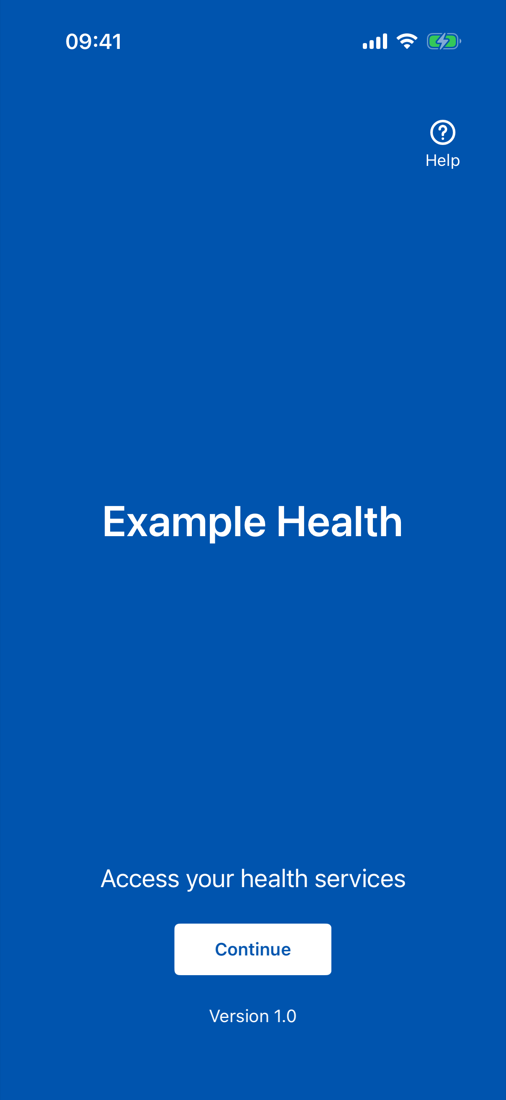
The start screen, then a top bar with the service's name and help, the tab's screens and a tab bar. Each tab keeps its own stack of screens, and Android's Back goes back within it. Each bar paints its own edge of the screen, so the page takes no safe area. MAUI has no selected trait for a button, so the selected tab says so in its name, and Messages says how many are unread.
MainPage.cs
using Microsoft.Maui.Controls.Shapes;
using static PatientApp.Parts;

namespace PatientApp;

public enum Tab { Home, Messages, Profile }

/// <summary>
/// The app's frame: the start screen, then a top bar with the service's name and help, the tab's screens, and a tab bar. Each
/// tab keeps its own stack of screens; Android's Back goes back within it.
/// </summary>
public class MainPage : ContentPage
{
    private readonly ContentView host = new();
    private readonly Grid tabBar = new() { Padding = new Thickness(0, 8, 0, 0) };
    private readonly Dictionary<Tab, List<Func<Action, View>>> stacks = new()
    {
        [Tab.Home] = [], [Tab.Messages] = [], [Tab.Profile] = [],
    };
    private Tab tab = Tab.Home;

    public MainPage()
    {
        // Each bar paints its own edge of the screen, the top bar under the status bar and the tab bar under the home
        // indicator, so the page itself takes no safe area.
        SafeAreaEdges = SafeAreaEdges.None;
        BackgroundColor = Tokens.Primary;
        Content = Start();
    }

    private View Start()
    {
        var help = new Button
        {
            Text = Words.Help,
            ImageSource = "help.png",
            FontSize = 13,
            TextColor = Tokens.PrimaryContent,
            BackgroundColor = Colors.Transparent,
            HorizontalOptions = LayoutOptions.End,
            ContentLayout = new Button.ButtonContentLayout(Button.ButtonContentLayout.ImagePosition.Top, 2),
        };
        var name = Text(Words.AppName, 34, bold: true, color: Tokens.PrimaryContent);
        name.HorizontalOptions = LayoutOptions.Center;
        SemanticProperties.SetHeadingLevel(name, SemanticHeadingLevel.Level1);
        var go = new Button
        {
            Text = Words.Continue,
            FontAttributes = FontAttributes.Bold,
            TextColor = Tokens.Primary,
            BackgroundColor = Tokens.Base100,
            CornerRadius = (int)Tokens.RadiusField,
            Padding = new Thickness(32, 12),
            HorizontalOptions = LayoutOptions.Center,
        };
        go.Clicked += (_, _) => Shell();
        var heading = Text(Words.StartHeading, 20, color: Tokens.PrimaryContent);
        heading.HorizontalOptions = LayoutOptions.Center;
        var version = Text(Words.Version, 14, color: Tokens.PrimaryContent);
        version.HorizontalOptions = LayoutOptions.Center;
        var grid = new Grid
        {
            SafeAreaEdges = SafeAreaEdges.All,
            Padding = new Thickness(24),
            RowDefinitions = [new RowDefinition(GridLength.Auto), new RowDefinition(GridLength.Star), new RowDefinition(GridLength.Auto)],
        };
        grid.Add(help, 0, 0);
        grid.Add(name, 0, 1);
        grid.Add(new VerticalStackLayout { Spacing = 24, Children = { heading, go, version } }, 0, 2);
        name.VerticalOptions = LayoutOptions.Center;
        return grid;
    }

    private void Shell()
    {
        BackgroundColor = Tokens.Base200;
        var frame = new Grid
        {
            SafeAreaEdges = SafeAreaEdges.None,
            RowDefinitions = [new RowDefinition(GridLength.Auto), new RowDefinition(GridLength.Star), new RowDefinition(GridLength.Auto)],
        };
        frame.Add(new ContentView
        {
            Content = TopBar(),
            BackgroundColor = Tokens.Base200,
            SafeAreaEdges = new SafeAreaEdges(SafeAreaRegions.None, SafeAreaRegions.All, SafeAreaRegions.None, SafeAreaRegions.None),
        }, 0, 0);
        frame.Add(host, 0, 1);
        frame.Add(new ContentView
        {
            Content = tabBar,
            BackgroundColor = Tokens.Primary,
            SafeAreaEdges = new SafeAreaEdges(SafeAreaRegions.None, SafeAreaRegions.None, SafeAreaRegions.None, SafeAreaRegions.All),
        }, 0, 2);
        Content = frame;
        Show();
    }

    /// <summary>The service's name, as text (the app's own mark would go here, named for the service), and the help button.</summary>
    private static View TopBar()
    {
        var bar = new Grid
        {
            Padding = new Thickness(16, 4),
            BackgroundColor = Tokens.Base200,
            ColumnDefinitions = [new ColumnDefinition(GridLength.Star), new ColumnDefinition(GridLength.Auto)],
        };
        var name = Text(Words.AppName, 20, bold: true, color: Tokens.Primary);
        name.VerticalOptions = LayoutOptions.Center;
        bar.Add(name, 0);
        bar.Add(new Button
        {
            Text = Words.AppHelp,
            FontAttributes = FontAttributes.Bold,
            TextColor = Tokens.Primary,
            BackgroundColor = Colors.Transparent,
            BorderColor = Tokens.Base300,
            BorderWidth = 1,
            CornerRadius = (int)Tokens.RadiusField,
            MaximumWidthRequest = 140,
            StyleClass = ["fit"],
            AutomationId = "fit-help",
        }, 1);
        return bar;
    }

    private void Open(Func<Action, View> screen)
    {
        stacks[tab].Add(screen);
        Show();
    }

    private void Back()
    {
        stacks[tab].RemoveAt(stacks[tab].Count - 1);
        Show();
    }

    private void Show()
    {
        var stack = stacks[tab];
        host.Content = stack.Count > 0
            ? stack[^1].Invoke(Back)
            : tab switch
            {
                Tab.Home => Screens.Home(Open),
                Tab.Messages => Screens.Messages(Open),
                _ => Screens.Profile(Open),
            };
        DrawTabs();
    }

    protected override bool OnBackButtonPressed()
    {
        if (stacks.TryGetValue(tab, out var stack) && stack.Count > 0)
        {
            Back();
            return true;
        }
        return base.OnBackButtonPressed();
    }

    /// <summary>
    /// The tab bar, drawn here so it matches the service's design. MAUI has no selected trait for a button, so the selected
    /// tab says so in its name, and Messages says how many are unread.
    /// </summary>
    private void DrawTabs()
    {
        tabBar.Children.Clear();
        tabBar.ColumnDefinitions.Clear();
        (Tab Tab, string Label, string Icon)[] tabs =
            [(Tab.Home, Words.Home, "home.png"), (Tab.Messages, Words.Messages, "messages.png"), (Tab.Profile, Words.Profile, "profile.png")];
        for (var i = 0; i < tabs.Length; i++)
        {
            var (which, label, icon) = tabs[i];
            var selected = which == tab;
            tabBar.ColumnDefinitions.Add(new ColumnDefinition(GridLength.Star));
            var button = new Button
            {
                Text = label,
                ImageSource = icon,
                FontSize = 12,
                FontAttributes = selected ? FontAttributes.Bold : FontAttributes.None,
                TextColor = Tokens.PrimaryContent,
                BackgroundColor = Colors.Transparent,
                MinimumHeightRequest = 52,
                StyleClass = ["fit"],
                AutomationId = $"fit-{which}",
                ContentLayout = new Button.ButtonContentLayout(Button.ButtonContentLayout.ImagePosition.Top, 4),
            };
            var spoken = which == Tab.Messages && Records.Unread > 0 ? $"{label}, {Words.Unread(Records.Unread)}" : label;
            SemanticProperties.SetDescription(button, selected ? Words.Selected(spoken) : spoken);
            button.Clicked += (_, _) =>
            {
                tab = which;
                Show();
            };
            var cell = new Grid { Children = { button } };
            if (which == Tab.Messages && Records.Unread > 0)
            {
                cell.Children.Add(new Ellipse
                {
                    Fill = Tokens.Error,
                    WidthRequest = 10,
                    HeightRequest = 10,
                    HorizontalOptions = LayoutOptions.Center,
                    VerticalOptions = LayoutOptions.Start,
                    Margin = new Thickness(18, 4, 0, 0),
                    InputTransparent = true,
                });
            }
            tabBar.Add(cell, i);
        }
    }
}
Step 7: Start the app
The theme's tokens, and light colours for the system's own parts, so the status bar is readable in dark mode. A tab's label and the help button shrink to fit at the largest text sizes, as the system's own tab bar keeps its labels, rather than being cut off or squeezing the service's name.
MauiProgram.cs
using LilyDesignSystem.Maui.Themes;

namespace PatientApp;

public static class MauiProgram
{
    public static MauiApp CreateMauiApp()
    {
        var builder = MauiApp.CreateBuilder();
        builder.UseMauiApp<App>();
        // A tab's label, or the top bar's help button, is a word or two in a narrow space: at the largest text sizes it shrinks
        // to fit, as the system's own tab bar keeps its labels, rather than being cut off or squeezing the service's name.
        Microsoft.Maui.Handlers.ButtonHandler.Mapper.AppendToMapping("FitLabel", (handler, view) =>
        {
            if (view is not Button { StyleClass: { } classes } || !classes.Contains("fit")) return;
#if IOS
            handler.PlatformView.TitleLabel.AdjustsFontSizeToFitWidth = true;
            handler.PlatformView.TitleLabel.MinimumScaleFactor = 0.5f;
#endif
        });
        return builder.Build();
    }
}

public class App : Application
{
    public App()
    {
        // The app draws the theme's light colours only, so the system draws its own parts for light too.
        UserAppTheme = AppTheme.Light;
        // The NHS England patient theme's tokens, for {DynamicResource lily-color-…}.
        LilyTheme.Apply(Resources, LilyTokens.NhsEnglandPatients);
    }

    protected override Window CreateWindow(IActivationState? activationState) =>
        new(new MainPage()) { Title = Words.AppName };
}
Check your work: run dotnet build -t:Run -f net11.0-ios (or net11.0-android). Turn on VoiceOver and move through the tab bar: each tab
says its name, the selected one says so, and Messages says "1 unread message". Set the
largest text size in Settings: the words grow, and nothing is cut off.
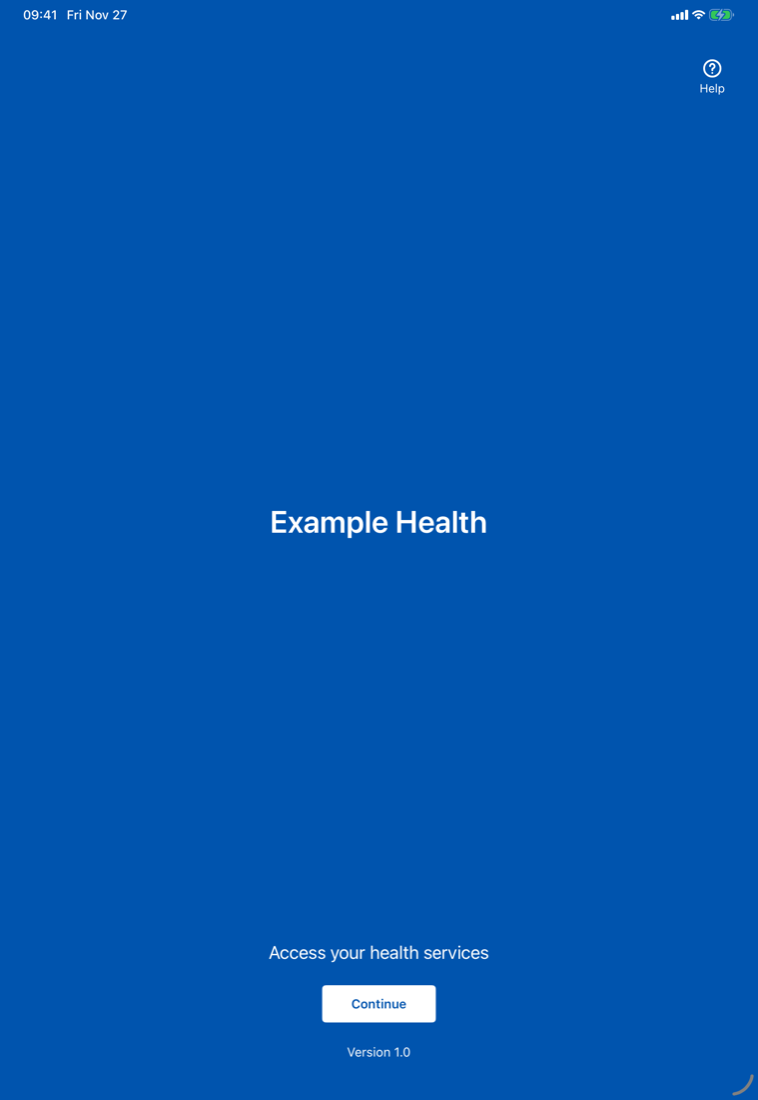
The screenshots on this page are from the iPhone 17 and iPad Pro 11-inch simulators, taken by a UI test that walked the seven screens with Apple's accessibility audit and passed. That test drives the built app from outside it, so it is not one of the app's files here.
What this does not do yet
- It signs no one in, and asks no service for records: the start screen's button goes straight in, and the records are examples.
- Most links open a screen that says it is not part of the tutorial; each is where the service would go.
- It has one language. The words are in one place, so adding another touches no page.
Next steps
- Swift version: the same app on iPhone and iPad.
- Kotlin version: the same app on Android phones and tablets.