
Public health information page tutorial
Build the kind of page a public health service publishes about a medicine, in the shape such services use, with SvelteKit and Lily.
What you'll build
A medicine page for paracetamol, laid out as public health services lay theirs out: the service's header with its mark, a search field and a menu; breadcrumbs and a back link; the medicine's name, its common brands and a lede; sections with lists, inset text, urgent advice and an important note; the dates the page was reviewed and will be next; and a footer. About 40 minutes.
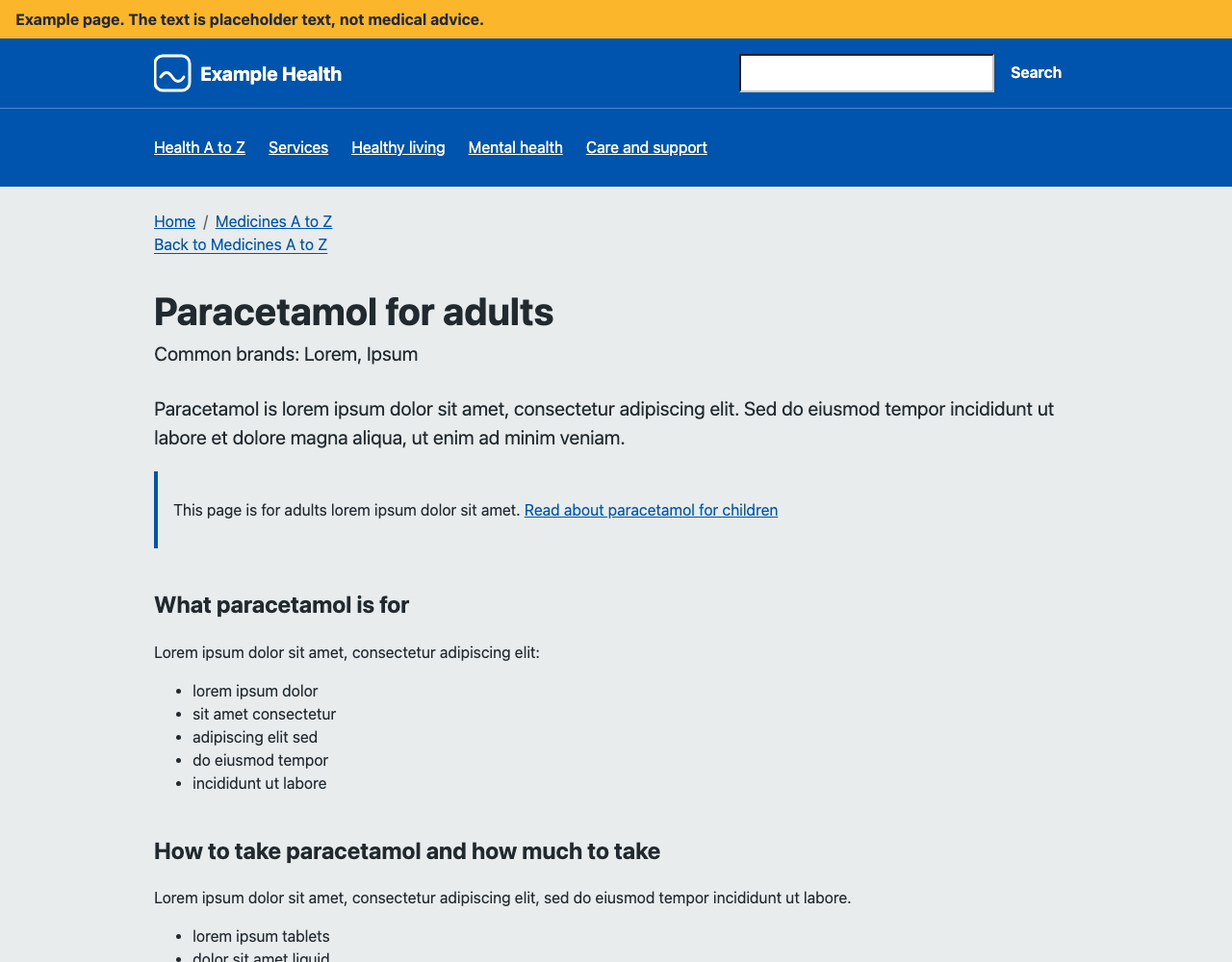
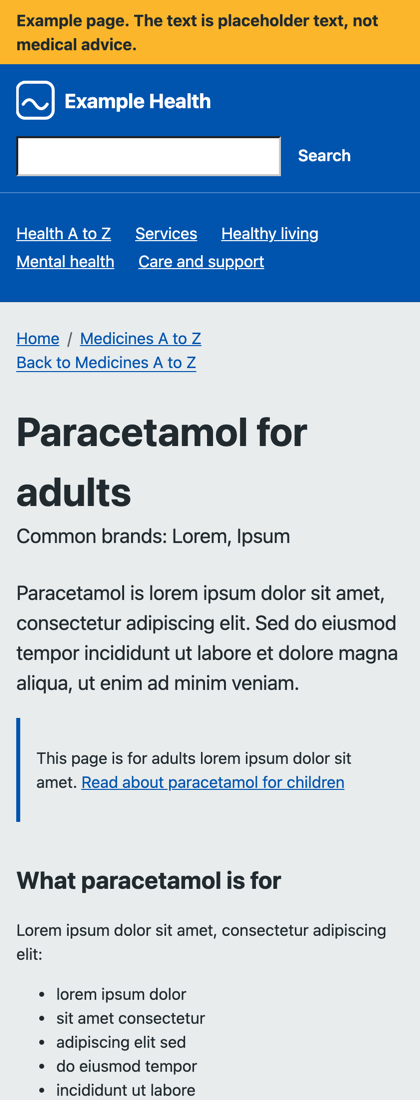
For learning only. Every sentence on the page is placeholder text, not medical advice. The structure is what the tutorial teaches; a real page's words come from its clinical authors.
Whose look this is
The page wears Lily's NHS England patient theme, and its layout follows the medicine pages public health services publish. It is not any service's page. Its service, Example Health, is fictional, with a mark drawn for this tutorial, and it names no real service or country: a theme lends a look, never another body's identity (visual identity). One of the tests checks it.
Before you start
You need Node 26, pnpm, and a little Svelte: the Svelte tutorial is enough. Make the app, then add Lily:
npx sv create health-page --template minimal --types ts --no-add-ons --install pnpm
cd health-page
pnpm add @lilydesignsystem/svelte-headless @lilydesignsystem/themes
pnpm add -D vitest
Each code block below is one whole file, under the path shown above it. Copy it as it is, replacing the file if the new app already has one.
Step 1: The words and the content
Every word the site's frame shows is in one file, so the site can be translated without touching a component. The page's content is data: the structure of a medicine page, with placeholder text. Each block names its kind, so each kind can be drawn with the Lily component made for it.
src/lib/words.ts
// Every word the site's frame shows, in one place, so the site can be translated without touching a component. The service is
// fictional: a theme lends a look, never another body's name or mark.

export const words = {
  /** The language and date style the site writes in, for Intl. */
  locale: "en-GB",
  service: "Example Health",
  home: "Example Health home page",
  skip: "Skip to main content",
  notice: "Example page. The text is placeholder text, not medical advice.",
  search: "Search the Example Health website",
  searchButton: "Search",
  menu: "Main menu",
  nav: [
    { text: "Health A to Z", href: "/medicines/" },
    { text: "Services", href: "/" },
    { text: "Healthy living", href: "/" },
    { text: "Mental health", href: "/" },
    { text: "Care and support", href: "/" },
  ],
  breadcrumbs: "Breadcrumb",
  homeCrumb: "Home",
  medicines: "Medicines A to Z",
  back: "Back to Medicines A to Z",
  lastReviewed: "Page last reviewed:",
  nextReview: "Next review due:",
  support: "Support links",
  footer: [
    ["Home", "Health A to Z", "Services", "Healthy living", "Mental health", "Care and support"],
    ["View your test results", "About us", "Health care abroad"],
    ["Report an issue with this website", "Accessibility statement", "Our policies", "Cookies"],
  ],
  copyright: "© Example Health",
};
src/lib/content.ts
// The page's content, as data. The structure follows a public health service's medicine page; the text is placeholder text, so
// nothing here is advice. A real page's words come from its clinical authors, with a review date.

export type Block =
  | { kind: "p"; text: string }
  | { kind: "list"; items: string[] }
  | { kind: "inset"; text: string; link?: { text: string; href: string } }
  | { kind: "urgent"; heading: string; items: string[]; after?: string }
  | { kind: "important"; heading: string; text: string };

export interface Part {
  heading: string;
  blocks: Block[];
}

export interface Section {
  heading: string;
  blocks: Block[];
  parts?: Part[];
}

export interface Medicine {
  name: string;
  brands: string;
  lede: string;
  intro: Block[];
  sections: Section[];
  /** YYYY-MM-DD: a calendar date. */
  lastReviewed: string;
  /** How often the page is reviewed, in whole years. */
  reviewEvery: number;
}

const lorem = "Lorem ipsum dolor sit amet, consectetur adipiscing elit, sed do eiusmod tempor incididunt ut labore.";

export const paracetamol: Medicine = {
  name: "Paracetamol for adults",
  brands: "Common brands: Lorem, Ipsum",
  lede: "Paracetamol is lorem ipsum dolor sit amet, consectetur adipiscing elit. Sed do eiusmod tempor incididunt ut labore et dolore magna aliqua, ut enim ad minim veniam.",
  intro: [
    {
      kind: "inset",
      text: "This page is for adults lorem ipsum dolor sit amet.",
      link: { text: "Read about paracetamol for children", href: "/medicines/" },
    },
  ],
  sections: [
    {
      heading: "What paracetamol is for",
      blocks: [
        { kind: "p", text: "Lorem ipsum dolor sit amet, consectetur adipiscing elit:" },
        {
          kind: "list",
          items: ["lorem ipsum dolor", "sit amet consectetur", "adipiscing elit sed", "do eiusmod tempor", "incididunt ut labore"],
        },
      ],
    },
    {
      heading: "How to take paracetamol and how much to take",
      blocks: [
        { kind: "p", text: lorem },
        { kind: "list", items: ["lorem ipsum tablets", "dolor sit amet liquid", "consectetur suppositories"] },
      ],
      parts: [
        {
          heading: "How to take and use common types of paracetamol",
          blocks: [
            { kind: "p", text: "Ut enim ad minim veniam, quis nostrud exercitation ullamco laboris nisi ut aliquip ex ea commodo." },
            { kind: "list", items: ["duis aute irure dolor", "in reprehenderit in voluptate", "velit esse cillum dolore"] },
          ],
        },
        {
          heading: "If you take too much paracetamol",
          blocks: [
            { kind: "p", text: "Excepteur sint occaecat cupidatat non proident, sunt in culpa qui officia deserunt mollit anim." },
            {
              kind: "urgent",
              heading: "Urgent advice: Get help now if:",
              items: ["lorem ipsum dolor sit amet, even if you feel well"],
              after: "Consectetur adipiscing elit, sed do eiusmod tempor.",
            },
            { kind: "inset", text: "Ut labore et dolore magna aliqua. Ut enim ad minim veniam." },
          ],
        },
      ],
    },
    {
      heading: "Side effects of paracetamol",
      blocks: [{ kind: "p", text: lorem }],
      parts: [
        {
          heading: "Serious side effects",
          blocks: [
            { kind: "p", text: "Quis nostrud exercitation ullamco laboris:" },
            { kind: "list", items: ["nisi ut aliquip ex ea commodo", "consequat duis aute irure", "dolor in reprehenderit"] },
            { kind: "urgent", heading: "Urgent advice: Get help now if:", items: ["voluptate velit esse cillum dolore"] },
          ],
        },
        {
          heading: "More about side effects",
          blocks: [{ kind: "p", text: "Eu fugiat nulla pariatur. Excepteur sint occaecat cupidatat non proident." }],
        },
      ],
    },
    {
      heading: "Who can and cannot take paracetamol",
      blocks: [{ kind: "p", text: lorem }],
      parts: [
        { heading: "Breastfeeding and paracetamol", blocks: [{ kind: "p", text: "Sunt in culpa qui officia deserunt mollit anim id est laborum." }] },
        { heading: "Pregnancy and paracetamol", blocks: [{ kind: "p", text: "Sed ut perspiciatis unde omnis iste natus error sit voluptatem." }] },
      ],
    },
    {
      heading: "Taking paracetamol with other medicines, food and drink",
      blocks: [
        { kind: "important", heading: "Important", text: "Accusantium doloremque laudantium, totam rem aperiam, eaque ipsa quae ab illo." },
        { kind: "list", items: ["inventore veritatis", "et quasi architecto", "beatae vitae dicta", "sunt explicabo"] },
      ],
      parts: [
        { heading: "Taking paracetamol with ibuprofen", blocks: [{ kind: "p", text: "Nemo enim ipsam voluptatem quia voluptas sit aspernatur." }] },
        { heading: "Food, drink and alcohol with paracetamol", blocks: [{ kind: "p", text: "Aut odit aut fugit, sed quia consequuntur magni dolores." }] },
      ],
    },
    {
      heading: "Find out more about your medicine",
      blocks: [{ kind: "list", items: ["eos qui ratione voluptatem", "sequi nesciunt neque porro", "quisquam est qui dolorem"] }],
    },
  ],
  lastReviewed: "2026-03-24",
  reviewEvery: 3,
};
Step 2: The rules, with tests
A page with no logic still has rules: when its next review is due, how a date is written, and the id each heading gives its section. A date is a calendar date, so it is written in UTC and no time zone moves it a day; a 29 February lands on 28 February in a year with none; and a date that is not a real day is an error, never a quiet guess.
src/lib/page.ts
// The page's rules, as pure functions with tests: when the next review is due, how a date is written, and the id a section's
// heading gives its anchor. Bad input is an error, never a quiet guess.

export class PageError extends Error {
  readonly reason: "date" | "years";
  constructor(reason: "date" | "years", message: string) {
    super(message);
    this.reason = reason;
  }
}

function parts(iso: string): [number, number, number] {
  const m = /^(\d{4})-(\d{2})-(\d{2})$/.exec(iso);
  if (!m) throw new PageError("date", `${iso} is not YYYY-MM-DD`);
  const [year, month, day] = [Number(m[1]), Number(m[2]), Number(m[3])];
  const date = new Date(Date.UTC(year, month - 1, day));
  if (date.getUTCMonth() !== month - 1 || date.getUTCDate() !== day) throw new PageError("date", `${iso} is not a real day`);
  return [year, month, day];
}

const leap = (year: number) => (year % 4 === 0 && year % 100 !== 0) || year % 400 === 0;

/** The date `years` whole years after `iso`. A 29 February lands on 28 February in a year with none. */
export function addYears(iso: string, years: number): string {
  if (!Number.isInteger(years) || years < 0) throw new PageError("years", `${years} is not a whole number of years`);
  const [year, month, given] = parts(iso);
  let day = given;
  const to = year + years;
  if (month === 2 && day === 29 && !leap(to)) day = 28;
  return `${String(to).padStart(4, "0")}-${String(month).padStart(2, "0")}-${String(day).padStart(2, "0")}`;
}

/** A date as the site's readers write it: "24 March 2026". In UTC, so no time zone moves a calendar date a day. */
export function longDate(iso: string, locale: string): string {
  const [year, month, day] = parts(iso);
  return new Intl.DateTimeFormat(locale, { dateStyle: "long", timeZone: "UTC" }).format(Date.UTC(year, month - 1, day));
}

/** The id a heading gives its section, for a link to it: lower case, words joined by hyphens. */
export function sectionId(heading: string): string {
  return heading
    .toLowerCase()
    .replace(/[^a-z0-9]+/g, "-")
    .replace(/^-|-$/g, "");
}
The tests also check the content names no real service or country.
src/lib/page.test.ts
import { describe, expect, it } from "vitest";
import { paracetamol } from "./content.js";
import { addYears, longDate, PageError, sectionId } from "./page.js";
import { words } from "./words.js";

describe("the page's rules", () => {
  it("adds whole years to a review date", () => {
    expect(addYears("2026-03-24", 3)).toBe("2029-03-24");
    expect(addYears("2026-03-24", 0)).toBe("2026-03-24");
  });

  it("lands a 29 February on 28 February in a year with none", () => {
    expect(addYears("2028-02-29", 1)).toBe("2029-02-28");
    expect(addYears("2028-02-29", 4)).toBe("2032-02-29");
  });

  it("refuses a date that is not a real day", () => {
    expect(() => addYears("2026-02-30", 1)).toThrow(PageError);
    expect(() => longDate("24/03/2026", "en-GB")).toThrow(expect.objectContaining({ reason: "date" }));
  });

  it("refuses years that are not whole and not negative", () => {
    for (const years of [-1, 1.5, Number.NaN]) {
      expect(() => addYears("2026-03-24", years)).toThrow(expect.objectContaining({ reason: "years" }));
    }
  });

  it("writes a date as the site's readers do", () => {
    expect(longDate("2026-03-24", "en-GB")).toBe("24 March 2026");
  });

  it("gives each heading an id for its anchor", () => {
    expect(sectionId("Who can and cannot take paracetamol")).toBe("who-can-and-cannot-take-paracetamol");
    expect(sectionId("Food, drink and alcohol with paracetamol")).toBe("food-drink-and-alcohol-with-paracetamol");
  });
});

describe("the content", () => {
  it("gives every section a different id", () => {
    const ids = paracetamol.sections.map((s) => sectionId(s.heading));
    expect(new Set(ids).size).toBe(ids.length);
  });

  it("names no real service or country: the service is fictional", () => {
    const text = JSON.stringify({ paracetamol, words });
    expect(text).not.toMatch(/\bNHS\b|\bUK\b|United Kingdom|England|\b111\b/);
  });
});
Check your work: run pnpm vitest run. All eight tests pass.
Step 3: The service's frame
The service's mark goes in a link to its home page, named for the service, never "logo". The header is Lily's Header with the mark, a search form with Lily's SearchInput, and the menu; the footer is Lily's Footer. An amber line in the header says the page is an example, on every page.
src/lib/components/Logo.svelte
<script lang="ts">
  // The service's own mark: a wave in a rounded square, and its name. Fictional, drawn for this tutorial; a real service uses its
  // own. The accessible name is the service's name, never "logo".
  let { name }: { name: string } = $props();
</script>

<svg class="logo" role="img" aria-label={name} viewBox="0 0 220 40" height="40">
  <rect x="1" y="2" width="36" height="36" rx="8" fill="none" stroke="currentColor" stroke-width="3" />
  <path d="M7 24c4-6 8-6 12 0s8 6 12 0" fill="none" stroke="currentColor" stroke-width="3" stroke-linecap="round" />
  <text x="48" y="28" fill="currentColor" font-size="20" font-weight="700" font-family="system-ui, sans-serif">{name}</text>
</svg>
src/lib/components/SiteHeader.svelte
<script lang="ts">
  import { Header, SearchInput } from "@lilydesignsystem/svelte-headless";
  import Logo from "#lib/components/Logo.svelte";
  import { words } from "#lib/words.js";
</script>

<Header class="site-header">
  <p class="site-notice">{words.notice}</p>
  <div class="site-header-row">
    <a href="/" data-lily-logo aria-label={words.home}><Logo name={words.service} /></a>
    <form class="site-search" role="search" action="/" method="get">
      <SearchInput label={words.search} name="q" />
      <button class="button" type="submit">{words.searchButton}</button>
    </form>
  </div>
  <nav class="site-nav" aria-label={words.menu}>
    <ul>
      {#each words.nav as link (link.text)}
        <li><a href={link.href}>{link.text}</a></li>
      {/each}
    </ul>
  </nav>
</Header>
src/lib/components/SiteFooter.svelte
<script lang="ts">
  import { Footer } from "@lilydesignsystem/svelte-headless";
  import { words } from "#lib/words.js";
</script>

<Footer class="site-footer">
  <h2 class="screen-reader-span">{words.support}</h2>
  <div class="site-footer-lists">
    {#each words.footer as list, i (i)}
      <ul>
        {#each list as text (text)}
          <li><a href="/">{text}</a></li>
        {/each}
      </ul>
    {/each}
  </div>
  <p>{words.copyright}</p>
</Footer>
The theme styles Lily's components; the service's own design is the app's: a band of the theme's primary colour behind the header, the page colours, and a readable column. It uses only the theme's custom properties, so another theme changes it too.
src/app.css
/* The service's own design, on top of the theme: a band of the theme's primary colour behind the header, the theme's page and
   link colours, and a readable column. Lily ships none of this; it is the app's, as a service's identity always is. */

body {
  margin: 0;
  background: var(--color-base-200);
  color: var(--color-base-content);
  font-family: var(--lily-font-body);
  line-height: var(--lily-line-height-body, 1.5);
}

.site-main a {
  color: var(--color-primary);
}

/* Urgent advice: its heading on a band of the theme's error colour, in that colour's own text colour. */
.care-card[data-type="urgent"] {
  padding: 0;
  background: var(--color-base-100);
}

.care-card[data-type="urgent"] > h2 {
  margin: 0;
  padding: 0.75rem 1rem;
  background: var(--color-error);
  color: var(--color-error-content);
  font-size: 1.25rem;
}

.care-card[data-type="urgent"] > :not(h2) {
  margin-inline: 1rem;
}

.site-header {
  background: var(--color-primary);
  color: var(--color-primary-content);
  padding: 0;
}

.site-notice {
  margin: 0;
  padding: 0.5rem 1rem;
  background: var(--color-warning);
  color: var(--color-warning-content);
  font-weight: 700;
}

.site-header-row,
.site-nav ul,
.site-main,
.site-footer-lists,
.site-footer p {
  max-inline-size: 60rem;
  margin-inline: auto;
  padding-inline: 1rem;
}

.site-header-row {
  display: flex;
  flex-wrap: wrap;
  align-items: center;
  justify-content: space-between;
  gap: 1rem;
  padding-block: 1rem;
}

.site-header a[data-lily-logo] {
  color: var(--color-primary-content);
}

.site-search {
  display: flex;
  flex: 1 1 14rem;
  max-inline-size: 22rem;
}

.site-search .search-input {
  flex: 1;
  min-inline-size: 0;
}

.site-nav {
  border-block-start: 1px solid color-mix(in oklab, var(--color-primary-content) 30%, transparent);
}

.site-nav ul {
  display: flex;
  flex-wrap: wrap;
  gap: 0.25rem 1.5rem;
  list-style: none;
  padding-block: 0.75rem;
}

.site-nav a {
  color: var(--color-primary-content);
}

.site-main {
  display: block;
  padding-block: 1.5rem 3rem;
}

.medicine h1 {
  font-size: 2.5rem;
}

.medicine-brands {
  display: block;
  font-size: 1.25rem;
  font-weight: 400;
}

.medicine-lede {
  font-size: 1.25rem;
}

.medicine h2 {
  margin-block-start: 2.5rem;
}

.medicine-review {
  margin-block-start: 3rem;
}

.site-footer {
  border-block-start: 0.25rem solid var(--color-primary);
  background: var(--color-base-100);
  padding-block: 1.5rem;
}

.site-footer-lists {
  display: grid;
  grid-template-columns: repeat(auto-fit, minmax(12rem, 1fr));
  gap: 1rem;
}

.site-footer-lists ul {
  list-style: none;
  margin: 0;
  padding: 0;
}
The layout puts a skip link first, then the header, the page and the footer.
src/routes/+layout.svelte
<script lang="ts">
  import "@lilydesignsystem/themes/united-kingdom-national-health-service-england-for-patients.css";
  import "../app.css";
  import { SkipLink } from "@lilydesignsystem/svelte-headless";
  import SiteHeader from "#lib/components/SiteHeader.svelte";
  import SiteFooter from "#lib/components/SiteFooter.svelte";
  import { words } from "#lib/words.js";
  import type { LayoutProps } from "./$types";

  let { children }: LayoutProps = $props();
</script>

<SkipLink href="#content" label={words.skip} />
<SiteHeader />
<main id="content" class="site-main" tabindex="-1">{@render children()}</main>
<SiteFooter />
Step 4: The blocks
Each kind of block is drawn with its Lily component: InsetText for a note beside the text, CareCard with type="urgent" for urgent advice, and WarningCallout for an important note.
src/lib/components/Blocks.svelte
<script lang="ts">
  import { CareCard, InsetText, WarningCallout } from "@lilydesignsystem/svelte-headless";
  import type { Block } from "#lib/content.js";

  // One block of content, each kind drawn with the Lily component made for it.
  let { blocks }: { blocks: Block[] } = $props();
</script>

{#each blocks as block, i (i)}
  {#if block.kind === "p"}
    <p>{block.text}</p>
  {:else if block.kind === "list"}
    <ul>
      {#each block.items as item (item)}<li>{item}</li>{/each}
    </ul>
  {:else if block.kind === "inset"}
    <InsetText>
      <p>{block.text}{#if block.link}{" "}<a href={block.link.href}>{block.link.text}</a>{/if}</p>
    </InsetText>
  {:else if block.kind === "urgent"}
    <CareCard type="urgent" heading={block.heading}>
      <ul>
        {#each block.items as item (item)}<li>{item}</li>{/each}
      </ul>
      {#if block.after}<p>{block.after}</p>{/if}
    </CareCard>
  {:else if block.kind === "important"}
    <WarningCallout label={block.heading}>
      <h3>{block.heading}</h3>
      <p>{block.text}</p>
    </WarningCallout>
  {/if}
{/each}
Step 5: The pages
The medicine page: breadcrumbs and a back link, the name with its brands, the lede, then each section with an id from its heading, and the review dates in Lily's ReviewDate, a <time> with the machine-readable date.
src/routes/medicines/paracetamol-for-adults/+page.svelte
<script lang="ts">
  import {
    BackLink,
    BreadcrumbLink,
    BreadcrumbList,
    BreadcrumbListItem,
    BreadcrumbNav,
    ReviewDate,
  } from "@lilydesignsystem/svelte-headless";
  import Blocks from "#lib/components/Blocks.svelte";
  import { paracetamol as medicine } from "#lib/content.js";
  import { addYears, longDate, sectionId } from "#lib/page.js";
  import { words } from "#lib/words.js";

  const nextReview = addYears(medicine.lastReviewed, medicine.reviewEvery);
</script>

<svelte:head><title>{medicine.name} - {words.service}</title></svelte:head>

<BreadcrumbNav label={words.breadcrumbs}>
  <BreadcrumbList>
    <BreadcrumbListItem><BreadcrumbLink href="/">{words.homeCrumb}</BreadcrumbLink></BreadcrumbListItem>
    <BreadcrumbListItem><BreadcrumbLink href="/medicines/">{words.medicines}</BreadcrumbLink></BreadcrumbListItem>
  </BreadcrumbList>
</BreadcrumbNav>
<BackLink href="/medicines/">{words.back}</BackLink>

<article class="medicine">
  <h1>{medicine.name} <span class="medicine-brands">{medicine.brands}</span></h1>
  <p class="medicine-lede">{medicine.lede}</p>
  <Blocks blocks={medicine.intro} />

  {#each medicine.sections as section (section.heading)}
    <section aria-labelledby={sectionId(section.heading)}>
      <h2 id={sectionId(section.heading)}>{section.heading}</h2>
      <Blocks blocks={section.blocks} />
      {#each section.parts ?? [] as part (part.heading)}
        <h3>{part.heading}</h3>
        <Blocks blocks={part.blocks} />
      {/each}
    </section>
  {/each}

  <p class="medicine-review">
    {words.lastReviewed} <ReviewDate datetime={medicine.lastReviewed} label="">{longDate(medicine.lastReviewed, words.locale)}</ReviewDate><br />
    {words.nextReview} <ReviewDate datetime={nextReview} label="">{longDate(nextReview, words.locale)}</ReviewDate>
  </p>
</article>
src/routes/medicines/+page.svelte
<script lang="ts">
  import { words } from "#lib/words.js";
  import { paracetamol } from "#lib/content.js";
</script>

<svelte:head><title>{words.medicines} - {words.service}</title></svelte:head>

<h1>{words.medicines}</h1>
<ul>
  <li><a href="/medicines/paracetamol-for-adults/">{paracetamol.name}</a></li>
</ul>
src/routes/+page.svelte
<script lang="ts">
  import { words } from "#lib/words.js";
</script>

<svelte:head><title>{words.service}</title></svelte:head>

<h1>{words.service}</h1>
<p><a href="/medicines/">{words.medicines}</a></p>
Check your work: run pnpm dev and open /medicines/paracetamol-for-adults/. Press Tab: the skip link comes first and takes you to the page. Narrow the window to a phone's width: nothing scrolls sideways.
What this does not do yet
- Search goes nowhere, and most links go home: the medicine page is the lesson.
- The content is placeholder text in a TypeScript file. A real service keeps its pages in a content system, with authors, reviewers and the dates this page shows.
- It has one language. The words and the content are data, so another language is another copy of each.
Next steps
- Patient app tutorials: the same theme on a phone app.
- Pre-operative assessment by patient tutorial: a form a patient fills in, with SvelteKit and Lily.