
Pre-operative assessment in Swift
The questions a patient answers before an operation, on iPhone, with SwiftUI and Lily: the same questionnaire and rules as the web tutorial.
What you'll build
The web tutorial's questionnaire, as an iPhone app: five short sections (about you, heart and lungs, medicines, allergies and anaesthetics), then a screen to check the answers before they are sent. A date of birth typed in parts, a weight and a height in the patient's own units, a list of medicines that grows as the patient adds them, the steps they have done, and an error summary that takes them to each missing answer. The answers are saved on the phone as they go. About an hour.
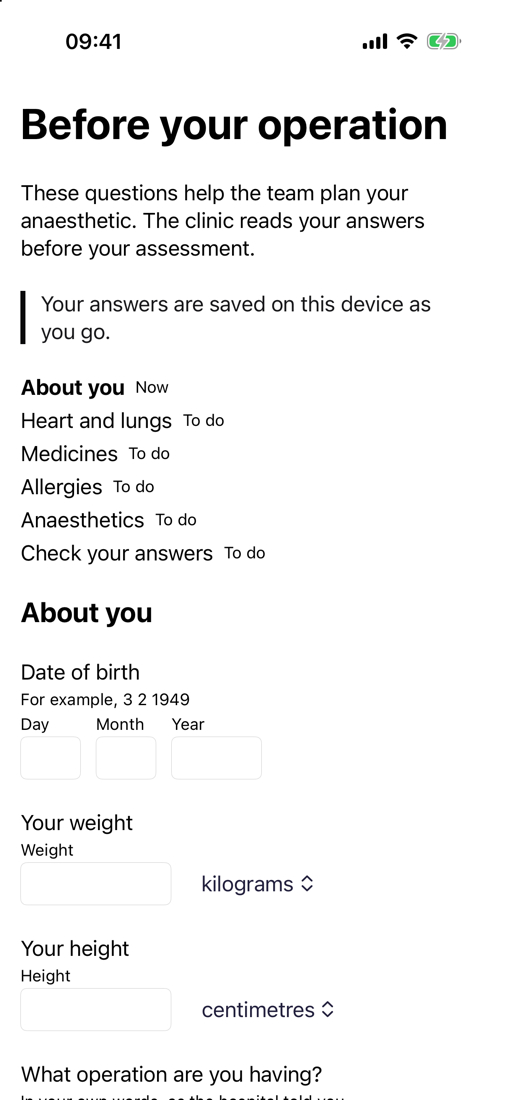
It asks; it does not judge. No answer gives the patient a grade or a score: the anaesthetist assigns the ASA grade at the assessment, from these answers and their own findings.
Before you start
You need Xcode 26 or later and the Swift tutorial's first
steps. In Xcode, choose File ▸ New ▸ Project ▸ iOS ▸ App, name it PreOperativeAssessment, with SwiftUI and the Swift Testing system. Then File ▸ Add Package Dependencies…, enter this address, and add LilyUI, LilyCore and LilyThemes to the app:
https://github.com/LilyDesignSystem/lily-design-system-swift.gitVersion 0.2.0 or later: it has the date field, quantity input, repeatable fieldset and step
list. Each code block below is one whole file in the app's PreOperativeAssessment folder; replace the file Xcode made where the names match, and delete ContentView.swift.
Step 1: Write the words
Every word the app shows is in one file, so translating the app touches no view. The date's parts are in the order this app's readers write a date; a reader elsewhere may write the year first, so the order is a word too, not an assumption. The step statuses are words, so a step never says where the patient is by colour or a tick alone.
PreOperativeAssessment/Words.swift
import LilyCore

// Every word the app shows, in one place, so the app can be translated without touching a view.

enum Words {
    /** The language the app writes in, for formatting dates. */
    static let locale = "en-GB"
    /** The clinic's time zone, IANA: whose "today" a date of birth is checked against. */
    static let timeZone = "Europe/London"
    static let title = "Before your operation"
    static let intro = "These questions help the team plan your anaesthetic. The clinic reads your answers before your assessment."
    static let saved = "Your answers are saved on this device as you go."
    static let restored = "We filled in the answers you saved on this device."
    static let keep = "Keep my answers"
    static let startAgain = "Start again"
    static let steps = "Questions"
    static let stepNames = ["About you", "Heart and lungs", "Medicines", "Allergies", "Anaesthetics", "Check your answers"]
    static func status(_ status: StepStatus) -> String {
        switch status {
        case .finished: "Done"
        case .inProgress: "Now"
        case .waiting: "To do"
        }
    }
    static let back = "Back"
    static let next = "Continue"
    static let send = "Send to the clinic"
    static let problem = "There is a problem"
    static func answer(_ answer: Answer) -> String {
        switch answer {
        case .unanswered: "Not answered"
        case .yes: "Yes"
        case .no: "No"
        case .notSure: "Not sure"
        }
    }
    static let dateLabel = "Date of birth"
    static let day = "Day"
    static let month = "Month"
    static let year = "Year"
    static let dateHint = "For example, 3 2 1949"
    /** The parts in the order this app's readers write a date. */
    static let dateOrder = DateFieldOrder.dmy
    static let weightLabel = "Your weight"
    static let weight = "Weight"
    static let weightUnit = "Weight unit"
    static let heightLabel = "Your height"
    static let height = "Height"
    static let heightUnit = "Height unit"
    static let kilograms = "kilograms"
    static let pounds = "pounds"
    static let centimetres = "centimetres"
    static let inches = "inches"
    static let operation = "What operation are you having?"
    static let operationHint = "In your own words, as the hospital told you"
    static let couldBePregnant = "Could you be pregnant?"
    static let highBloodPressure = "Have you been told you have high blood pressure?"
    static let breathlessOnStairs = "Do you get chest pain or very short of breath climbing one flight of stairs?"
    static let bloodThinner = "Do you take medicine to thin your blood?"
    static let bloodThinnerName = "Which medicine?"
    static let bloodThinnerHint = "For example, warfarin or apixaban"
    static let anyMedicines = "Do you take any medicines?"
    static let anyMedicinesHint = "Include ones you buy yourself, and inhalers, creams and injections"
    static let medicines = "Your medicines"
    static func medicine(_ n: Int) -> String { "Medicine \(n)" }
    static let addMedicine = "Add a medicine"
    static func removeMedicine(_ n: Int) -> String { "Remove medicine \(n)" }
    static func medicineAdded(_ n: Int) -> String { "Medicine \(n) added" }
    static func medicineRemoved(_ n: Int) -> String { "Medicine \(n) removed" }
    static let medicineName = "Name"
    static let medicineDose = "How much, and how often"
    static let anyAllergies = "Are you allergic to anything?"
    static let anyAllergiesHint = "Medicines, foods, plasters, latex or anything else"
    static let allergies = "Your allergies"
    static func allergy(_ n: Int) -> String { "Allergy \(n)" }
    static let addAllergy = "Add an allergy"
    static func removeAllergy(_ n: Int) -> String { "Remove allergy \(n)" }
    static func allergyAdded(_ n: Int) -> String { "Allergy \(n) added" }
    static func allergyRemoved(_ n: Int) -> String { "Allergy \(n) removed" }
    static let substance = "What are you allergic to?"
    static let reaction = "What happens?"
    static let severe = "Has it ever made it hard to breathe, or made your face or throat swell?"
    static let severeShort = "Severe reaction"
    static let anaesthesiaBefore = "Have you had an anaesthetic before?"
    static let anaesthesiaProblem = "Did you have a problem with it?"
    static let anaesthesiaProblemDetails = "What happened?"
    static let familyAnaesthesiaProblem = "Has a blood relative had a serious problem with an anaesthetic?"
    static let errors: [String: String] = [
        "birth-date": "Enter your date of birth as a real date that has passed",
        "weight": "Enter your weight",
        "height": "Enter your height",
        "operation": "Enter the operation you are having",
        "could-be-pregnant": "Answer whether you could be pregnant",
        "high-blood-pressure": "Answer the question about blood pressure",
        "breathless-on-stairs": "Answer the question about chest pain or breathlessness",
        "blood-thinner": "Answer the question about blood-thinning medicine",
        "any-medicines": "Answer whether you take any medicines",
        "medicine-list": "Add the medicines you take, or answer no",
        "any-allergies": "Answer whether you are allergic to anything",
        "allergy-list": "Add what you are allergic to, or answer no",
        "anaesthesia-before": "Answer whether you have had an anaesthetic before",
        "anaesthesia-problem": "Answer whether you had a problem with it",
        "family-anaesthesia-problem": "Answer the question about your family",
    ]
    static let change = "Change"
    static let sentTitle = "Your answers have been sent"
    static let sentBody = "Thank you. Bring your medicines, or a list of them, to your assessment."
}
Step 2: Hold the answers
Every question starts unanswered, which is not the same as "no". A follow-up's answer is kept while the patient changes their mind, and left out when it is sent.
PreOperativeAssessment/Answers.swift
// What the patient says. Every question starts unanswered, which is not the same as "no".

enum Answer: String, Codable, CaseIterable {
    case unanswered = ""
    case yes
    case no
    case notSure = "not-sure"
}

struct Quantity: Codable, Hashable {
    var magnitude = ""
    var unit: String
}

struct Medicine: Codable, Hashable {
    var name = ""
    var dose = ""
}

struct Allergy: Codable, Hashable {
    var substance = ""
    var reaction = ""
    /** Did it ever make it hard to breathe, or swell the face or throat? */
    var severe = Answer.unanswered
}

struct Answers: Codable, Hashable {
    /** YYYY-MM-DD once all three parts are filled, else "". */
    var birthDate = ""
    var weight = Quantity(unit: "kg")
    var height = Quantity(unit: "cm")
    var operation = ""
    /** Asked of everyone: "no" covers anyone who cannot be. */
    var couldBePregnant = Answer.unanswered
    var highBloodPressure = Answer.unanswered
    var breathlessOnStairs = Answer.unanswered
    var bloodThinner = Answer.unanswered
    /** Asked only when bloodThinner is yes. */
    var bloodThinnerName = ""
    var anyMedicines = Answer.unanswered
    /** Asked only when anyMedicines is yes. */
    var medicines: [Medicine] = []
    var anyAllergies = Answer.unanswered
    /** Asked only when anyAllergies is yes. */
    var allergies: [Allergy] = []
    var anaesthesiaBefore = Answer.unanswered
    /** Asked only when anaesthesiaBefore is yes. */
    var anaesthesiaProblem = Answer.unanswered
    /** Asked only when anaesthesiaProblem is yes. */
    var anaesthesiaProblemDetails = ""
    var familyAnaesthesiaProblem = Answer.unanswered
}
Step 3: Write the rules, with tests
The rules are pure functions, the same as the web tutorial's: what is sent, what is missing,
and whether a date of birth is a real day that has passed. "Today" is the clinic's day, in
its time zone, not the phone's. isCalendarDate comes from LilyCore, so 31 February is never a birthday.
PreOperativeAssessment/Rules.swift
import Foundation
import LilyCore

// The rules, as pure functions, the same as the web tutorial's. None of them grades the patient: the anaesthetist assigns the
// ASA grade, from these answers and their own findings. These say what to send and what is missing.

enum Section: Int, CaseIterable {
    case about, heart, medicines, allergies, anaesthesia
}

enum Rules {
    static let pound = 0.45359237
    static let inch = 0.0254

    /** Weight in kilograms, or nil when it is not a number above zero. */
    static func kilograms(_ weight: Quantity) -> Double? {
        guard let n = Double(weight.magnitude), n.isFinite, n > 0 else { return nil }
        return weight.unit == "lb" ? n * pound : n
    }

    /** Height in metres, or nil when it is not a number above zero. */
    static func metres(_ height: Quantity) -> Double? {
        guard let n = Double(height.magnitude), n.isFinite, n > 0 else { return nil }
        return height.unit == "in" ? n * inch : n / 100
    }

    /** What is sent: an answer the patient can no longer see is left out, and so is an entry with no name. */
    static func sent(_ a: Answers) -> Answers {
        var s = a
        s.bloodThinnerName = a.bloodThinner == .yes ? a.bloodThinnerName : ""
        s.medicines = a.anyMedicines == .yes ? a.medicines.filter { !$0.name.trimmingCharacters(in: .whitespaces).isEmpty } : []
        s.allergies = a.anyAllergies == .yes ? a.allergies.filter { !$0.substance.trimmingCharacters(in: .whitespaces).isEmpty } : []
        s.anaesthesiaProblem = a.anaesthesiaBefore == .yes ? a.anaesthesiaProblem : .unanswered
        s.anaesthesiaProblemDetails = s.anaesthesiaProblem == .yes ? a.anaesthesiaProblemDetails : ""
        return s
    }

    /** Today, YYYY-MM-DD, in the clinic's time zone: a date of birth is checked against the clinic's day, not the phone's. */
    static func today(timeZone: String, now: Date = Date()) -> String {
        var calendar = Calendar(identifier: .gregorian)
        calendar.timeZone = TimeZone(identifier: timeZone) ?? .gmt
        let d = calendar.dateComponents([.year, .month, .day], from: now)
        return String(format: "%04d-%02d-%02d", d.year ?? 0, d.month ?? 0, d.day ?? 0)
    }

    /** Whether a date of birth is a real day on or before today. The date field checks only that its parts are numbers. */
    static func isBirthDate(_ iso: String, onOrBefore: String) -> Bool {
        iso.count == 10 && isCalendarDate(iso) && iso <= onOrBefore
    }

    /** The questions in a section that still need an answer, by their id. `on` is today, from `today`. */
    static func missing(_ section: Section, _ a: Answers, on: String) -> [String] {
        func need(_ id: String, _ answered: Bool) -> [String] { answered ? [] : [id] }
        switch section {
        case .about:
            return need("birth-date", isBirthDate(a.birthDate, onOrBefore: on))
                + need("weight", kilograms(a.weight) != nil)
                + need("height", metres(a.height) != nil)
                + need("operation", !a.operation.trimmingCharacters(in: .whitespaces).isEmpty)
                + need("could-be-pregnant", a.couldBePregnant != .unanswered)
        case .heart:
            return need("high-blood-pressure", a.highBloodPressure != .unanswered)
                + need("breathless-on-stairs", a.breathlessOnStairs != .unanswered)
                + need("blood-thinner", a.bloodThinner != .unanswered)
        case .medicines:
            return need("any-medicines", a.anyMedicines != .unanswered)
                + need("medicine-list", a.anyMedicines != .yes || !sent(a).medicines.isEmpty)
        case .allergies:
            return need("any-allergies", a.anyAllergies != .unanswered)
                + need("allergy-list", a.anyAllergies != .yes || !sent(a).allergies.isEmpty)
        case .anaesthesia:
            return need("anaesthesia-before", a.anaesthesiaBefore != .unanswered)
                + need("anaesthesia-problem", a.anaesthesiaBefore != .yes || a.anaesthesiaProblem != .unanswered)
                + need("family-anaesthesia-problem", a.familyAnaesthesiaProblem != .unanswered)
        }
    }
}
Add a test target: File ▸ New ▸ Target ▸ Unit Testing Bundle, named PreOperativeAssessmentTests, with Swift Testing. Each test names one rule.
PreOperativeAssessmentTests/RulesTests.swift
import Foundation
import Testing
@testable import PreOperativeAssessment

// The rules, checked without a simulator: each test names one rule.

@Test func weightIsInKilogramsAndPoundsAreConverted() {
    #expect(Rules.kilograms(Quantity(magnitude: "70", unit: "kg")) == 70)
    #expect(abs((Rules.kilograms(Quantity(magnitude: "154", unit: "lb")) ?? 0) - 69.853) < 0.001)
    #expect(Rules.kilograms(Quantity(magnitude: "0", unit: "kg")) == nil)
    #expect(Rules.kilograms(Quantity(magnitude: "heavy", unit: "kg")) == nil)
}

@Test func heightIsInMetres() {
    #expect(Rules.metres(Quantity(magnitude: "170", unit: "cm")) == 1.7)
    #expect(abs((Rules.metres(Quantity(magnitude: "67", unit: "in")) ?? 0) - 1.7018) < 0.0001)
}

@Test func aDateOfBirthIsARealDayThatHasPassed() {
    #expect(Rules.isBirthDate("1949-02-03", onOrBefore: "2026-11-27"))
    #expect(!Rules.isBirthDate("1949-02-31", onOrBefore: "2026-11-27"))
    #expect(!Rules.isBirthDate("2030-01-01", onOrBefore: "2026-11-27"))
    #expect(!Rules.isBirthDate("", onOrBefore: "2026-11-27"))
}

@Test func todayIsTheClinicsDay() {
    let lateInLondon = Date(timeIntervalSince1970: 1_798_761_000) // 2026-12-31 23:50 UTC
    #expect(Rules.today(timeZone: "Europe/London", now: lateInLondon) == "2026-12-31")
    #expect(Rules.today(timeZone: "Asia/Tokyo", now: lateInLondon) == "2027-01-01")
}

@Test func aHiddenAnswerIsNotSent() {
    var a = Answers()
    a.bloodThinner = .no
    a.bloodThinnerName = "warfarin"
    a.anyMedicines = .yes
    a.medicines = [Medicine(name: "Ramipril", dose: "5 mg daily"), Medicine()]
    a.anaesthesiaBefore = .no
    a.anaesthesiaProblem = .yes
    a.anaesthesiaProblemDetails = "Sick"
    let s = Rules.sent(a)
    #expect(s.bloodThinnerName == "")
    #expect(s.medicines == [Medicine(name: "Ramipril", dose: "5 mg daily")])
    #expect(s.anaesthesiaProblem == .unanswered)
    #expect(s.anaesthesiaProblemDetails == "")
}

@Test func notSureIsAnAnswerButAnEmptyListAfterYesIsNot() {
    var a = Answers()
    #expect(Rules.missing(.medicines, a, on: "2026-11-27") == ["any-medicines"])
    a.anyMedicines = .yes
    #expect(Rules.missing(.medicines, a, on: "2026-11-27") == ["medicine-list"])
    a.anyMedicines = .notSure
    #expect(Rules.missing(.medicines, a, on: "2026-11-27").isEmpty)
}

@Test func theFirstSectionNamesEachMissingAnswerInOrder() {
    #expect(Rules.missing(.about, Answers(), on: "2026-11-27") == ["birth-date", "weight", "height", "operation", "could-be-pregnant"])
}
Check your work: press ⌘ U. All seven tests pass.
Step 4: Save a draft
The answers are saved on the phone as the patient goes, so closing the app loses nothing, and cleared once they are sent.
PreOperativeAssessment/Draft.swift
import Foundation

// The answers so far, kept on this device as the patient goes, so closing the app loses nothing. Cleared when they are sent.

enum Draft {
    static let key = "pre-operative-answers"

    static func load() -> Answers? {
        UserDefaults.standard.data(forKey: key).flatMap { try? JSONDecoder().decode(Answers.self, from: $0) }
    }

    static func save(_ answers: Answers) {
        if answers == Answers() { return clear() }
        UserDefaults.standard.set(try? JSONEncoder().encode(answers), forKey: key)
    }

    static func clear() {
        UserDefaults.standard.removeObject(forKey: key)
    }
}
Step 5: Ask a question
Yes, no or not sure: "Not sure" is an answer the clinic can act on, and a guess is not. Each
option is a button that says whether it is selected. A follow-up sits straight after "Yes",
so VoiceOver reads it next. Lily's Field gives the question, the hint and the error.
PreOperativeAssessment/Question.swift
import LilyThemes
import LilyUI
import SwiftUI

/// A question answered yes, no or not sure, as radio buttons: each says its answer and whether it is selected. A follow-up,
/// when given, is asked only after "Yes": it sits straight after that answer, so VoiceOver reads it next, and the rules leave
/// its answer out when "Yes" is taken back. Lily's Field gives the question, the hint and the error.
struct Question<FollowUp: View>: View {
    let question: String
    var hint: String? = nil
    var error: String? = nil
    @Binding var value: Answer
    @ViewBuilder var followUp: () -> FollowUp
    @Environment(\.lilyTokens) private var tokens

    var body: some View {
        Field(label: question, description: hint, error: error) {
            VStack(alignment: .leading, spacing: 4) {
                ForEach([Answer.yes, .no, .notSure], id: \.self) { option in
                    Button { value = option } label: {
                        HStack(spacing: 12) {
                            Image(systemName: value == option ? "largecircle.fill.circle" : "circle")
                                .font(.title2)
                                .accessibilityHidden(true)
                            Text(Words.answer(option))
                            Spacer()
                        }
                        .frame(minHeight: 44)
                        .contentShape(Rectangle())
                    }
                    .foregroundStyle(tokens.baseContent)
                    .accessibilityAddTraits(value == option ? [.isSelected] : [])
                    if option == .yes && value == .yes {
                        followUp().padding(.leading, 16)
                    }
                }
            }
            .accessibilityElement(children: .contain)
        }
    }
}

extension Question where FollowUp == EmptyView {
    init(question: String, hint: String? = nil, error: String? = nil, value: Binding<Answer>) {
        self.init(question: question, hint: hint, error: error, value: value) { EmptyView() }
    }
}

/// A line of text the patient writes, in Lily's Field.
struct TextQuestion: View {
    let label: String
    var hint: String? = nil
    var error: String? = nil
    @Binding var text: String

    var body: some View {
        Field(label: label, description: hint, error: error) {
            TextField("", text: $text, axis: .vertical)
                .textFieldStyle(.roundedBorder)
        }
    }
}

/// An error under a list, for "add one, or answer no".
struct ListError: View {
    let message: String?
    var body: some View {
        if let message { Text(message).bold() }
    }
}
Step 6: The five sections
Each section is one view. Each question carries the id the rules use, so the error summary
can scroll to it. DateField joins its parts into an ISO date only when every
part is a number; QuantityInput keeps the number and its unit together.
PreOperativeAssessment/AboutYouView.swift
import LilyCore
import LilyUI
import SwiftUI

struct AboutYouView: View {
    @Binding var answers: Answers
    let errors: [String: String]

    var body: some View {
        DateField(
            label: Words.dateLabel, dayLabel: Words.day, monthLabel: Words.month, yearLabel: Words.year, order: Words.dateOrder,
            value: $answers.birthDate, description: Words.dateHint, error: errors["birth-date"]
        )
        .id("birth-date")
        QuantityInput(
            label: Words.weightLabel, magnitudeLabel: Words.weight, unitLabel: Words.weightUnit,
            units: [QuantityUnit(value: "kg", label: Words.kilograms), QuantityUnit(value: "lb", label: Words.pounds)],
            magnitude: $answers.weight.magnitude, unit: $answers.weight.unit, error: errors["weight"]
        )
        .id("weight")
        QuantityInput(
            label: Words.heightLabel, magnitudeLabel: Words.height, unitLabel: Words.heightUnit,
            units: [QuantityUnit(value: "cm", label: Words.centimetres), QuantityUnit(value: "in", label: Words.inches)],
            magnitude: $answers.height.magnitude, unit: $answers.height.unit, error: errors["height"]
        )
        .id("height")
        TextQuestion(label: Words.operation, hint: Words.operationHint, error: errors["operation"], text: $answers.operation)
            .id("operation")
        Question(question: Words.couldBePregnant, error: errors["could-be-pregnant"], value: $answers.couldBePregnant)
            .id("could-be-pregnant")
    }
}
PreOperativeAssessment/HeartAndLungsView.swift
import SwiftUI

struct HeartAndLungsView: View {
    @Binding var answers: Answers
    let errors: [String: String]

    var body: some View {
        Question(question: Words.highBloodPressure, error: errors["high-blood-pressure"], value: $answers.highBloodPressure)
            .id("high-blood-pressure")
        Question(question: Words.breathlessOnStairs, error: errors["breathless-on-stairs"], value: $answers.breathlessOnStairs)
            .id("breathless-on-stairs")
        Question(question: Words.bloodThinner, error: errors["blood-thinner"], value: $answers.bloodThinner) {
            TextQuestion(label: Words.bloodThinnerName, hint: Words.bloodThinnerHint, text: $answers.bloodThinnerName)
        }
        .id("blood-thinner")
    }
}
RepeatableFieldset is the "add another" pattern: each medicine is a named group with
its own remove button, and VoiceOver hears each add and remove in the app's words.
PreOperativeAssessment/MedicinesView.swift
import LilyUI
import SwiftUI

struct MedicinesView: View {
    @Binding var answers: Answers
    let errors: [String: String]

    var body: some View {
        Question(question: Words.anyMedicines, hint: Words.anyMedicinesHint, error: errors["any-medicines"], value: $answers.anyMedicines) {
            VStack(alignment: .leading, spacing: 8) {
                ListError(message: errors["medicine-list"])
                RepeatableFieldset(
                    legend: Words.medicines, items: $answers.medicines, newItem: { Medicine() }, itemLegend: Words.medicine,
                    addLabel: Words.addMedicine, removeLabel: Words.removeMedicine, max: 30,
                    addedLabel: Words.medicineAdded, removedLabel: Words.medicineRemoved
                ) { medicine, _ in
                    TextQuestion(label: Words.medicineName, text: medicine.name)
                    TextQuestion(label: Words.medicineDose, text: medicine.dose)
                }
            }
            .id("medicine-list")
        }
        .id("any-medicines")
    }
}
PreOperativeAssessment/AllergiesView.swift
import LilyUI
import SwiftUI

struct AllergiesView: View {
    @Binding var answers: Answers
    let errors: [String: String]

    var body: some View {
        Question(question: Words.anyAllergies, hint: Words.anyAllergiesHint, error: errors["any-allergies"], value: $answers.anyAllergies) {
            VStack(alignment: .leading, spacing: 8) {
                ListError(message: errors["allergy-list"])
                RepeatableFieldset(
                    legend: Words.allergies, items: $answers.allergies, newItem: { Allergy() }, itemLegend: Words.allergy,
                    addLabel: Words.addAllergy, removeLabel: Words.removeAllergy, max: 30,
                    addedLabel: Words.allergyAdded, removedLabel: Words.allergyRemoved
                ) { allergy, _ in
                    TextQuestion(label: Words.substance, text: allergy.substance)
                    TextQuestion(label: Words.reaction, text: allergy.reaction)
                    Question(question: Words.severe, value: allergy.severe)
                }
            }
            .id("allergy-list")
        }
        .id("any-allergies")
    }
}
PreOperativeAssessment/AnaesthesiaView.swift
import SwiftUI

struct AnaesthesiaView: View {
    @Binding var answers: Answers
    let errors: [String: String]

    var body: some View {
        Question(question: Words.anaesthesiaBefore, error: errors["anaesthesia-before"], value: $answers.anaesthesiaBefore) {
            Question(question: Words.anaesthesiaProblem, error: errors["anaesthesia-problem"], value: $answers.anaesthesiaProblem) {
                TextQuestion(label: Words.anaesthesiaProblemDetails, text: $answers.anaesthesiaProblemDetails)
            }
            .id("anaesthesia-problem")
        }
        .id("anaesthesia-before")
        Question(
            question: Words.familyAnaesthesiaProblem, error: errors["family-anaesthesia-problem"],
            value: $answers.familyAnaesthesiaProblem
        )
        .id("family-anaesthesia-problem")
    }
}
Step 7: Check the answers
The answers as they will be sent, through the same sent rule, so a hidden answer
is not shown either. Each section has a change button whose spoken name says which section.
PreOperativeAssessment/CheckAnswersView.swift
import Foundation
import LilyUI
import SwiftUI

/// The answers as they will be sent, so a hidden answer is not shown either, with a change button per section.
struct CheckAnswersView: View {
    let answers: Answers
    let change: (Int) -> Void

    private func date(_ iso: String) -> String {
        // A date of birth is a calendar date, not a moment: read and written in UTC so no time zone moves it a day.
        let parse = ISO8601DateFormatter()
        parse.formatOptions = [.withFullDate]
        guard let day = parse.date(from: iso) else { return Words.answer(.unanswered) }
        let style = Date.FormatStyle(date: .long, time: .omitted, locale: Locale(identifier: Words.locale), timeZone: .gmt)
        return day.formatted(style)
    }

    private func quantity(_ q: Quantity, _ units: [String: String]) -> String {
        q.magnitude.isEmpty ? Words.answer(.unanswered) : "\(q.magnitude) \(units[q.unit] ?? q.unit)"
    }

    private var sections: [(name: String, rows: [(String, String)])] {
        let s = Rules.sent(answers)
        let said = Words.answer
        return [
            (Words.stepNames[0], [
                (Words.dateLabel, date(s.birthDate)),
                (Words.weightLabel, quantity(s.weight, ["kg": Words.kilograms, "lb": Words.pounds])),
                (Words.heightLabel, quantity(s.height, ["cm": Words.centimetres, "in": Words.inches])),
                (Words.operation, s.operation.isEmpty ? said(.unanswered) : s.operation),
                (Words.couldBePregnant, said(s.couldBePregnant)),
            ]),
            (Words.stepNames[1], [
                (Words.highBloodPressure, said(s.highBloodPressure)),
                (Words.breathlessOnStairs, said(s.breathlessOnStairs)),
                (Words.bloodThinner, s.bloodThinnerName.isEmpty ? said(s.bloodThinner) : "\(said(s.bloodThinner)): \(s.bloodThinnerName)"),
            ]),
            (Words.stepNames[2], [(Words.anyMedicines, said(s.anyMedicines))]
                + s.medicines.enumerated().map { i, m in
                    (Words.medicine(i + 1), [m.name, m.dose].filter { !$0.isEmpty }.joined(separator: ", "))
                }),
            (Words.stepNames[3], [(Words.anyAllergies, said(s.anyAllergies))]
                + s.allergies.enumerated().map { i, x in
                    (Words.allergy(i + 1), [x.substance, x.reaction, x.severe == .yes ? Words.severeShort : ""]
                        .filter { !$0.isEmpty }.joined(separator: ", "))
                }),
            (Words.stepNames[4], [(Words.anaesthesiaBefore, said(s.anaesthesiaBefore))]
                + (s.anaesthesiaBefore == .yes
                    ? [(Words.anaesthesiaProblem, [said(s.anaesthesiaProblem), s.anaesthesiaProblemDetails]
                        .filter { !$0.isEmpty }.joined(separator: ": "))]
                    : [])
                + [(Words.familyAnaesthesiaProblem, said(s.familyAnaesthesiaProblem))]),
        ]
    }

    var body: some View {
        ForEach(Array(sections.enumerated()), id: \.offset) { step, section in
            VStack(alignment: .leading, spacing: 8) {
                HStack {
                    Text(section.name).font(.title3.bold()).accessibilityAddTraits(.isHeader)
                    Spacer()
                    Button(Words.change) { change(step) }
                        .accessibilityLabel("\(Words.change) \(section.name)")
                }
                SummaryList(label: section.name) {
                    ForEach(Array(section.rows.enumerated()), id: \.offset) { _, row in
                        SummaryListItem(term: row.0) { Text(row.1) }
                    }
                }
            }
        }
    }
}
Step 8: Put the questionnaire together
One section a screen, with the steps above it. Continue checks the section: when something
is missing, ErrorSummary lists it and moves VoiceOver to its title, and each problem
scrolls to its question.
PreOperativeAssessment/QuestionnaireView.swift
import LilyUI
import SwiftUI

/// The questionnaire: one section a screen, with the steps above it, an error summary when a section is not finished, and
/// the check-your-answers screen last. Each change is saved on this device.
struct QuestionnaireView: View {
    @State private var answers = Draft.load() ?? Answers()
    @State private var restored = Draft.load() != nil
    @State private var step = 0
    @State private var problems: [String] = []
    @State private var sent = false

    private var errors: [String: String] {
        Dictionary(uniqueKeysWithValues: problems.map { ($0, Words.errors[$0] ?? $0) })
    }

    var body: some View {
        ScrollViewReader { scroll in
            ScrollView {
                VStack(alignment: .leading, spacing: 24) {
                    Text(Words.title).font(.largeTitle.bold()).accessibilityAddTraits(.isHeader).id("top")
                    if sent {
                        LilyAlert(kind: .success, heading: Words.sentTitle, message: Words.sentBody)
                    } else {
                        if step == 0 {
                            Text(Words.intro)
                            InsetText { Text(Words.saved) }
                        }
                        if restored {
                            LilyAlert(kind: .info, message: Words.restored, politeness: .polite)
                            HStack {
                                Button(Words.keep) { restored = false }
                                Spacer()
                                Button(Words.startAgain) {
                                    answers = Answers()
                                    restored = false
                                    step = 0
                                }
                            }
                        }
                        StepList(label: Words.steps, steps: Words.stepNames, current: step, statusLabel: Words.status)
                        if !problems.isEmpty {
                            ErrorSummary(
                                title: Words.problem,
                                problems: problems.map { id in
                                    ErrorSummary.Problem(errors[id] ?? id) { withAnimation { scroll.scrollTo(id, anchor: .top) } }
                                }
                            )
                        }
                        Text(Words.stepNames[step]).font(.title2.bold()).accessibilityAddTraits(.isHeader)
                        section
                        HStack {
                            if step > 0 {
                                Button(Words.back) { go(to: step - 1, scroll) }
                            }
                            Spacer()
                            if let current = Section(rawValue: step) {
                                Button(Words.next) { finish(current, scroll) }.buttonStyle(.borderedProminent)
                            } else {
                                Button(Words.send) {
                                    Draft.clear()
                                    sent = true
                                }
                                .buttonStyle(.borderedProminent)
                            }
                        }
                    }
                }
                .padding()
            }
        }
        .onChange(of: answers) { if !sent { Draft.save(answers) } }
    }

    @ViewBuilder private var section: some View {
        switch Section(rawValue: step) {
        case .about: AboutYouView(answers: $answers, errors: errors)
        case .heart: HeartAndLungsView(answers: $answers, errors: errors)
        case .medicines: MedicinesView(answers: $answers, errors: errors)
        case .allergies: AllergiesView(answers: $answers, errors: errors)
        case .anaesthesia: AnaesthesiaView(answers: $answers, errors: errors)
        case nil: CheckAnswersView(answers: answers) { go(to: $0, nil) }
        }
    }

    private func finish(_ current: Section, _ scroll: ScrollViewProxy) {
        problems = Rules.missing(current, answers, on: Rules.today(timeZone: Words.timeZone))
        if problems.isEmpty { go(to: step + 1, scroll) } else { scroll.scrollTo("top", anchor: .top) }
    }

    private func go(to next: Int, _ scroll: ScrollViewProxy?) {
        problems = []
        step = next
        scroll?.scrollTo("top", anchor: .top)
    }
}
Step 9: Start the app
PreOperativeAssessment/PreOperativeAssessmentApp.swift
import LilyThemes
import SwiftUI

@main
struct PreOperativeAssessmentApp: App {
    var body: some Scene {
        WindowGroup {
            QuestionnaireView()
                .lilyTheme(.light)
        }
    }
}
Check your work: run the app in an iPhone simulator. Press Continue without answering: the error summary lists five problems, and each one takes you to its question. Type 31 2 1990: the date is not accepted. Answer Yes to medicines and add two, then close the app and open it again: your answers are still there.
What this does not do yet
- Send sends nowhere: a real app sends the answers to the clinic's service, over a secure connection, and keeps nothing on the phone once it has.
- The clinic's view, with what to look at first, is in the web tutorial.
- It has one language. The words are in one place, so adding another touches no view.
Next steps
- Web version: the same questionnaire in SvelteKit, with the clinic's view.
- Kotlin version: the same questionnaire on Android, with Jetpack Compose.
- .NET MAUI version: the same questionnaire in C#, for iPhone and Android.
- Swift tutorial: the rest of Lily's SwiftUI components.